Join us at FabCon Atlanta from March 16 - 20, 2026, for the ultimate Fabric, Power BI, AI and SQL community-led event. Save $200 with code FABCOMM.
Register now!Vote for your favorite vizzies from the Power BI Dataviz World Championship submissions. Vote now!
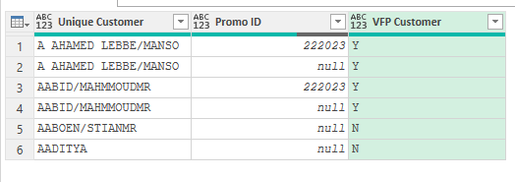
I want to compare two cell values in column 'Unique Customer', and 'Promo ID'. Unique Customer value can be repeatable, based on the date, with or without 'Promo ID'. I like to create a new column looking up entire column of unique Customer. if any of the unique customer containts Promo Id, I want to tag that Unique Customer as Y. Please help.
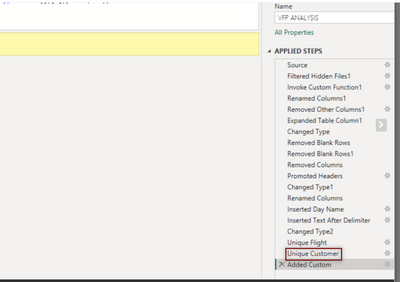
| This is not in my Excel folder source | |||
| New Column | |||
| Unique Customer | Promo ID | VFP Customer | |
| A AHAMED LEBBE/MANSO | 222023 | Y | |
| A AHAMED LEBBE/MANSO | Y | ||
| AABID/MAHMMOUDMR | 222023 | Y | |
| AABID/MAHMMOUDMR | Y | ||
| AABOEN/STIANMR | N | ||
| AADITYA | N |
Solved! Go to Solution.
Just paste the code I have provided in formula bar.
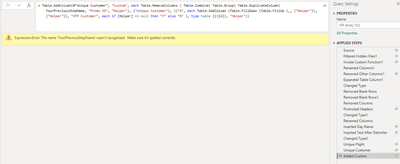
''YourPreviousStepName'' was just a place holder for the previous step in your query.
Since it has more than 1 word in its name it should be formated as #"Unique Customer".
Dear Jakinta,
Much appreciated the help.
You can try with step below after your step/table with columns "Unique Customer" & "Promo ID".
= Table.RemoveColumns ( Table.Combine( Table.Group( Table.DuplicateColumn( YourPreviousStepName, "Promo ID", "Helper"), {"Unique Customer"}, {{"A", each Table.AddColumn (Table.FillDown (Table.FillUp (_, {"Helper"}), {"Helper"}), "VFP Customer", each if [Helper] <> null then "Y" else "N" ), type table }})[A]), "Helper")
Much appreciated your help. However please see the error as shown in the photo
Just paste the code I have provided in formula bar.
''YourPreviousStepName'' was just a place holder for the previous step in your query.
Since it has more than 1 word in its name it should be formated as #"Unique Customer".
Vote for your favorite vizzies from the Power BI World Championship submissions!
If you love stickers, then you will definitely want to check out our Community Sticker Challenge!
Check out the January 2026 Power BI update to learn about new features.
| User | Count |
|---|---|
| 14 | |
| 11 | |
| 8 | |
| 7 | |
| 6 |