Join us at FabCon Atlanta from March 16 - 20, 2026, for the ultimate Fabric, Power BI, AI and SQL community-led event. Save $200 with code FABCOMM.
Register now!The Power BI Data Visualization World Championships is back! It's time to submit your entry. Live now!
I need help to use a M formula to calculate [Fiscal Qtr Offset], based on [Fiscal Mth]. Would really appreciate if you can help!
| Fiscal year | Fiscal Mth | Fiscal Qtr Offset |
| F2019 | 1 | -5 |
| 2 | -5 | |
| 3 | -5 | |
| 4 | -4 | |
| 5 | -4 | |
| 6 | -4 | |
| 7 | -3 | |
| 8 | -3 | |
| 9 | -3 | |
| 10 | -2 | |
| 11 | -2 | |
| 12 | -2 | |
| F2020 | 1 | -1 |
| 2 | -1 | |
| 3 | -1 | |
| 4 | 0 | |
| 5 | 0 | |
| 6 | 0 | |
| 7 | 1 | |
| 8 | 1 | |
| 9 | 1 | |
| 10 | 2 | |
| 11 | 2 | |
| 12 | 2 | |
| F2021 | 1 | 3 |
| 2 | 3 | |
| 3 | 3 | |
| 4 | 4 | |
| 5 | 4 | |
| 6 | 4 | |
| 7 | 5 | |
| 8 | 5 | |
| 9 | 5 | |
| 10 | 6 | |
| 11 | 6 | |
| 12 | 6 |
Solved! Go to Solution.
Thanks for the suggestion @v-frfei-msft
I have a much larger date table generated using PQ, so I was hoping to look for a PQ solution.
I was able to solve the issue - hope this will help others in the future:
= Number.RoundDown(((Date.Year([Date]) - Date.Year(CurrentDate)) * 12 + Date.Month([Date]) - Date.Month(CurrentDate)) / 3, 0)
Hi @Anonymous ,
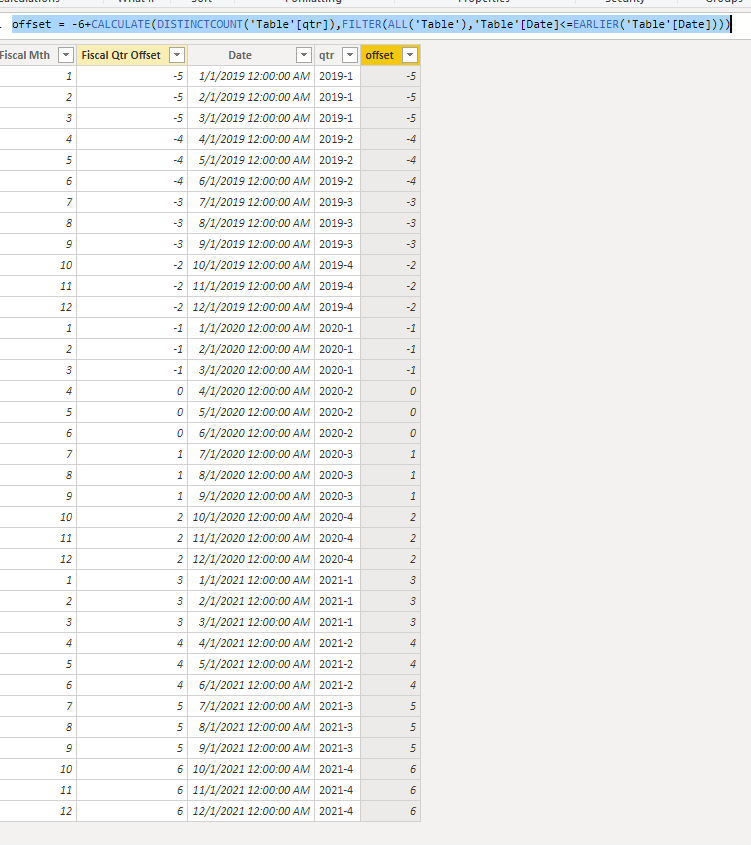
We can achieve that by DAX.
offset = -6+CALCULATE(DISTINCTCOUNT('Table'[qtr]),FILTER(ALL('Table'),'Table'[Date]<=EARLIER('Table'[Date])))
Pbix as attached.
Thanks for the suggestion @v-frfei-msft
I have a much larger date table generated using PQ, so I was hoping to look for a PQ solution.
I was able to solve the issue - hope this will help others in the future:
= Number.RoundDown(((Date.Year([Date]) - Date.Year(CurrentDate)) * 12 + Date.Month([Date]) - Date.Month(CurrentDate)) / 3, 0)
@Anonymous
Need little more explanation on how you are generating Fiscal Qtr Offset? The Current quarter will always be -1?
| User | Count |
|---|---|
| 20 | |
| 10 | |
| 8 | |
| 8 | |
| 7 |