Get certified for free when you join Fabric Data Days 2026 and dive into Fabric, Power BI, SQL, AI, and other essential data skills.
Join nowJuly 7 - July 17 | Round 2 of the Power BI Dataviz World Championships. Don't miss your chance! Learn more
I need help to use a M formula to calculate [Fiscal Qtr Offset], based on [Fiscal Mth]. Would really appreciate if you can help!
| Fiscal year | Fiscal Mth | Fiscal Qtr Offset |
| F2019 | 1 | -5 |
| 2 | -5 | |
| 3 | -5 | |
| 4 | -4 | |
| 5 | -4 | |
| 6 | -4 | |
| 7 | -3 | |
| 8 | -3 | |
| 9 | -3 | |
| 10 | -2 | |
| 11 | -2 | |
| 12 | -2 | |
| F2020 | 1 | -1 |
| 2 | -1 | |
| 3 | -1 | |
| 4 | 0 | |
| 5 | 0 | |
| 6 | 0 | |
| 7 | 1 | |
| 8 | 1 | |
| 9 | 1 | |
| 10 | 2 | |
| 11 | 2 | |
| 12 | 2 | |
| F2021 | 1 | 3 |
| 2 | 3 | |
| 3 | 3 | |
| 4 | 4 | |
| 5 | 4 | |
| 6 | 4 | |
| 7 | 5 | |
| 8 | 5 | |
| 9 | 5 | |
| 10 | 6 | |
| 11 | 6 | |
| 12 | 6 |
Solved! Go to Solution.
Thanks for the suggestion @v-frfei-msft
I have a much larger date table generated using PQ, so I was hoping to look for a PQ solution.
I was able to solve the issue - hope this will help others in the future:
= Number.RoundDown(((Date.Year([Date]) - Date.Year(CurrentDate)) * 12 + Date.Month([Date]) - Date.Month(CurrentDate)) / 3, 0)
Hi @Anonymous ,
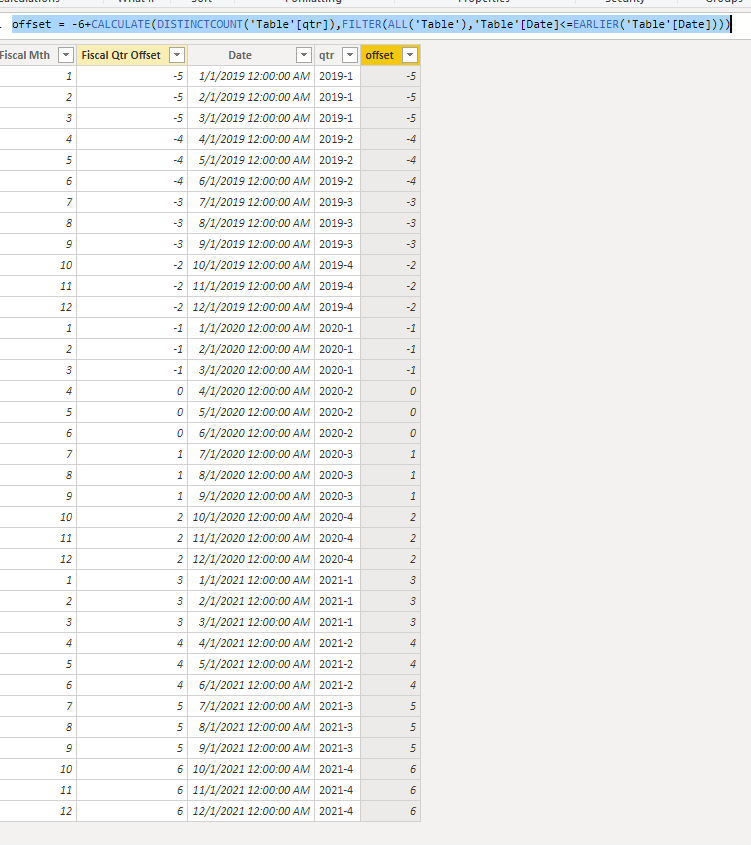
We can achieve that by DAX.
offset = -6+CALCULATE(DISTINCTCOUNT('Table'[qtr]),FILTER(ALL('Table'),'Table'[Date]<=EARLIER('Table'[Date])))
Pbix as attached.
Thanks for the suggestion @v-frfei-msft
I have a much larger date table generated using PQ, so I was hoping to look for a PQ solution.
I was able to solve the issue - hope this will help others in the future:
= Number.RoundDown(((Date.Year([Date]) - Date.Year(CurrentDate)) * 12 + Date.Month([Date]) - Date.Month(CurrentDate)) / 3, 0)
@Anonymous
Need little more explanation on how you are generating Fiscal Qtr Offset? The Current quarter will always be -1?
Join us in Barcelona for FabCon and SQLCon, the Fabric, Power BI, SQL, and AI community event. Save €200 with code FABCMTY200.
If you love stickers, then you will definitely want to check out our community sticker challenge, Barcelona edition!
Check out the July 2026 Power BI update to learn about new features.