cancel
Showing results for 
Search instead for 
Did you mean: 

Learn from the best! Meet the four finalists headed to the FINALS of the Power BI Dataviz World Championships! Register now

Reply
Anonymous
Not applicable

Combining text across columns

Thank you in advance for your help. If I have 2 columns of data (both text), 20 rows, and I want to move column 2 row 11-20 to column 1 row 11-20, (replacing what currentely exists in column 1 row 11-20) how would I do that? Thank you!

1 ACCEPTED SOLUTION
Anonymous
Not applicable

Hi,


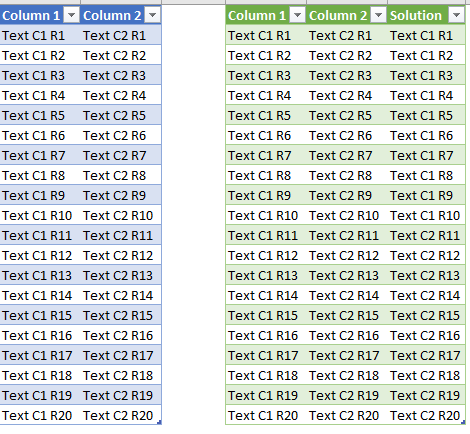
You can easily achieve this by adding an Index Column and then adding a New Conditional Column. 


Using the code below you will get the following result.


Annotation 2019-11-22 181653.png


let
    Source = Excel.CurrentWorkbook(){[Name="Data"]}[Content],
    #"Changed Type" = Table.TransformColumnTypes(Source,{{"Column 1", type text}, {"Column 2", type text}}),
    #"Added Index" = Table.AddIndexColumn(#"Changed Type", "Index", 1, 1),
    #"Added Custom" = Table.AddColumn(#"Added Index", "Solution", each if [Index]<11 then [Column 1] else [Column 2]),
    #"Changed Type1" = Table.TransformColumnTypes(#"Added Custom",{{"Solution", type text}}),
    #"Removed Columns" = Table.RemoveColumns(#"Changed Type1",{"Index"})
in
    #"Removed Columns"


Hope it helps.

View solution in original post

2 REPLIES 2
Anonymous
Not applicable

Hi,


You can easily achieve this by adding an Index Column and then adding a New Conditional Column. 


Using the code below you will get the following result.


Annotation 2019-11-22 181653.png


let
    Source = Excel.CurrentWorkbook(){[Name="Data"]}[Content],
    #"Changed Type" = Table.TransformColumnTypes(Source,{{"Column 1", type text}, {"Column 2", type text}}),
    #"Added Index" = Table.AddIndexColumn(#"Changed Type", "Index", 1, 1),
    #"Added Custom" = Table.AddColumn(#"Added Index", "Solution", each if [Index]<11 then [Column 1] else [Column 2]),
    #"Changed Type1" = Table.TransformColumnTypes(#"Added Custom",{{"Solution", type text}}),
    #"Removed Columns" = Table.RemoveColumns(#"Changed Type1",{"Index"})
in
    #"Removed Columns"


Hope it helps.

Anonymous
Not applicable

Got it! Thank you so much! I appreciate it.

Helpful resources

Announcements
Join our Fabric User Panel

Join our Fabric User Panel

Share feedback directly with Fabric product managers, participate in targeted research studies and influence the Fabric roadmap.

March Power BI Update Carousel

Power BI Community Update - March 2026

Check out the March 2026 Power BI update to learn about new features.