Share feedback directly with Fabric product managers, participate in targeted research studies and influence the Fabric roadmap.
Sign up nowGet Fabric certified for FREE! Don't miss your chance! Learn more
Thank you in advance for your help. If I have 2 columns of data (both text), 20 rows, and I want to move column 2 row 11-20 to column 1 row 11-20, (replacing what currentely exists in column 1 row 11-20) how would I do that? Thank you!
Solved! Go to Solution.
Hi,
You can easily achieve this by adding an Index Column and then adding a New Conditional Column.
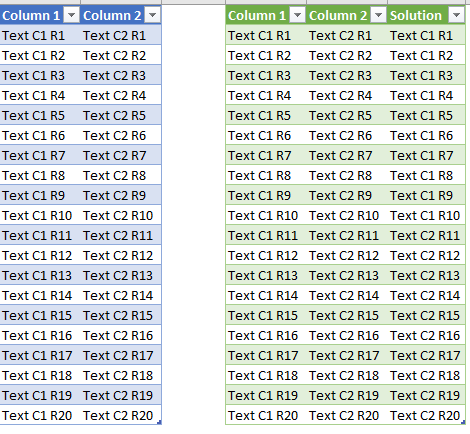
Using the code below you will get the following result.
let
Source = Excel.CurrentWorkbook(){[Name="Data"]}[Content],
#"Changed Type" = Table.TransformColumnTypes(Source,{{"Column 1", type text}, {"Column 2", type text}}),
#"Added Index" = Table.AddIndexColumn(#"Changed Type", "Index", 1, 1),
#"Added Custom" = Table.AddColumn(#"Added Index", "Solution", each if [Index]<11 then [Column 1] else [Column 2]),
#"Changed Type1" = Table.TransformColumnTypes(#"Added Custom",{{"Solution", type text}}),
#"Removed Columns" = Table.RemoveColumns(#"Changed Type1",{"Index"})
in
#"Removed Columns"
Hope it helps.
Hi,
You can easily achieve this by adding an Index Column and then adding a New Conditional Column.
Using the code below you will get the following result.
let
Source = Excel.CurrentWorkbook(){[Name="Data"]}[Content],
#"Changed Type" = Table.TransformColumnTypes(Source,{{"Column 1", type text}, {"Column 2", type text}}),
#"Added Index" = Table.AddIndexColumn(#"Changed Type", "Index", 1, 1),
#"Added Custom" = Table.AddColumn(#"Added Index", "Solution", each if [Index]<11 then [Column 1] else [Column 2]),
#"Changed Type1" = Table.TransformColumnTypes(#"Added Custom",{{"Solution", type text}}),
#"Removed Columns" = Table.RemoveColumns(#"Changed Type1",{"Index"})
in
#"Removed Columns"
Hope it helps.
Got it! Thank you so much! I appreciate it.
Share feedback directly with Fabric product managers, participate in targeted research studies and influence the Fabric roadmap.
| User | Count |
|---|---|
| 7 | |
| 4 | |
| 4 | |
| 3 | |
| 3 |
| User | Count |
|---|---|
| 11 | |
| 11 | |
| 10 | |
| 7 | |
| 6 |