cancel
Showing results for 
Search instead for 
Did you mean: 

Data Days is here! Join us now for 60+ days of learning, challenges, and connection. Learn more

Reply
Cheloo
New Member

Combine Line in powerquery

Dear All,

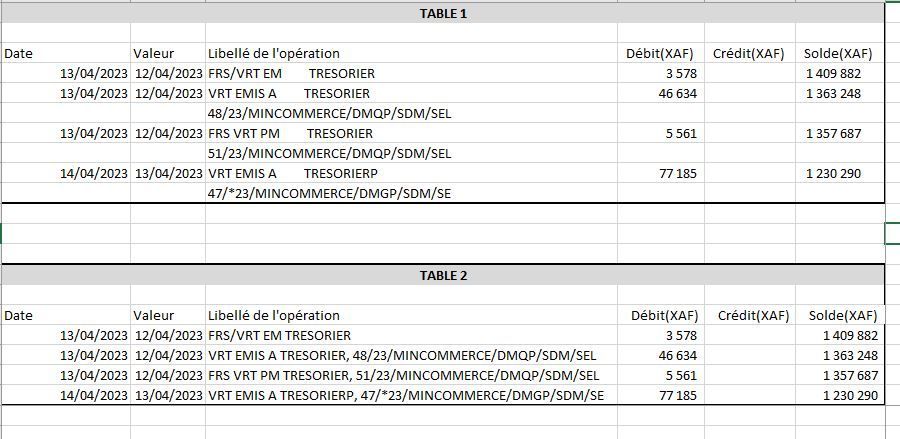
I use software that allows me to export accounting data as on (Table 1)

On the Label column of the operation, when the label is very long, during the data export, Excel automatically returns part of the label to the next line, which is not really to my taste, but I don't I have no power over this, however I would like to know if there is a manipulation in Excel using Power query that can allow this new line to be returned to the initial line as below like in (Table 2)

Initial and finalInitial and final


1 ACCEPTED SOLUTION
Rickmaurinus
Helper V
Helper V

Hey Cheloo,


Here's an approach you can try. First I want to create a unique ID for each row. To do that: 

  1. First filter away null values.
  2. Then add an index column which will create the IDs
  3. Then reference the table that includes null values (we do want these)
  4. Perform a merge on the table without the nulls, so we can add the unique ID to the rows
  5. Using the fill down operation, we can fill the ID and dates down to the rows that used to be empty
  6. We can then use Table.Group in combination with Text.Combine for text and List.Sum for the values


You can copy paste the below script into the advanced editor to see all steps in action. 


let
    Source = Table.FromRows(Json.Document(Binary.Decompress(Binary.FromText("bZDNboMwEIRfxeIcS14bG7gmaU79Uzn0EOXgkhVYTU1loBJ5+hpMqatGWtmalfab2T0eE844owwoh2TzK7gXTxVq638hhH99Kalk6is5bZY5AMrSn7lJSC8e2sH22ljyjPq9mwF8JQhQUqqZEFrlYO1I9noMcqo/+CLGT+K1Md0nOmNrsnWIV/Q94GmYlcrzQYGMHO5s1Wjb45kcWodd/8/IgxUFGYyCyLy410PdTDYv5gtdcFn2kFyAVAIilz126HpSanvubqzCcgr5emEvivlSrb2YnmxRV81ssPCLvMizCL5rryPZ6Tdjb4UXHriGFxTYFEfbasp+uOgP7GJ2nqUQBy977dxIHk3dxKc5fQM=", BinaryEncoding.Base64), Compression.Deflate)), let _t = ((type nullable text) meta [Serialized.Text = true]) in type table [Date = _t, Valeur = _t, #"Libelle de l'operation" = _t, Debit = _t, credit = _t, solde = _t]),
    Mydata = Table.TransformColumnTypes(Source,{{"Date", type date}, {"Valeur", type date}, {"Debit", Int64.Type}, {"solde", Int64.Type}, {"credit", Int64.Type}}), 
  RemoveNull         = Table.SelectRows (     Mydata,     each [Date] <> null ), 
  AddIndex           = Table.AddIndexColumn ( RemoveNull, "Index", 0, 1, Int64.Type ), 
  Show_Mydata_Step   = Mydata, 
  Merge_AddIndexStep = 
    Table.NestedJoin (
      Show_Mydata_Step, Table.ColumnNames ( Show_Mydata_Step ), 
      AddIndex,         Table.ColumnNames ( Show_Mydata_Step ), 
      "Custom1",        JoinKind.LeftOuter
  ), 
  ExpandIndex        = 
    Table.ExpandTableColumn (
      Merge_AddIndexStep, 
      "Custom1", 
      { "Index" }, 
      { "Index" }
    ), 
  FillDown           = Table.FillDown ( ExpandIndex, { "Date", "Valeur", "Index" } ), 
  GroupRows          = 
    Table.Group (
      FillDown, 
      { "Date", "Valeur", "Index" }, 
      {
        {
          "Libelle de l'operation", 
          each Text.Combine ( [#"Libelle de l'operation"], " " ), 
          type nullable text
        }, 
        { "Debit", each List.Sum ( [Debit] ),   type nullable number }, 
        { "credit", each List.Sum ( [credit] ), type nullable text }, 
        { "solde", each List.Sum ( [solde] ),   type nullable number }
      }
  )
in
  GroupRows


Let me know if this solves your issue, hope it helps!


Rick


--------------------------------------------------

@ me in replies or I'll lose your thread


Master Power Query M? -> https://powerquery.how

Read in-depth articles? -> BI Gorilla

Youtube Channel: BI Gorilla


If this post helps, then please consider accepting it as the solution to help other members find it more quickly.

View solution in original post

3 REPLIES 3
Rickmaurinus
Helper V
Helper V

Hey Cheloo,


Here's an approach you can try. First I want to create a unique ID for each row. To do that: 

  1. First filter away null values.
  2. Then add an index column which will create the IDs
  3. Then reference the table that includes null values (we do want these)
  4. Perform a merge on the table without the nulls, so we can add the unique ID to the rows
  5. Using the fill down operation, we can fill the ID and dates down to the rows that used to be empty
  6. We can then use Table.Group in combination with Text.Combine for text and List.Sum for the values


You can copy paste the below script into the advanced editor to see all steps in action. 


let
    Source = Table.FromRows(Json.Document(Binary.Decompress(Binary.FromText("bZDNboMwEIRfxeIcS14bG7gmaU79Uzn0EOXgkhVYTU1loBJ5+hpMqatGWtmalfab2T0eE844owwoh2TzK7gXTxVq638hhH99Kalk6is5bZY5AMrSn7lJSC8e2sH22ljyjPq9mwF8JQhQUqqZEFrlYO1I9noMcqo/+CLGT+K1Md0nOmNrsnWIV/Q94GmYlcrzQYGMHO5s1Wjb45kcWodd/8/IgxUFGYyCyLy410PdTDYv5gtdcFn2kFyAVAIilz126HpSanvubqzCcgr5emEvivlSrb2YnmxRV81ssPCLvMizCL5rryPZ6Tdjb4UXHriGFxTYFEfbasp+uOgP7GJ2nqUQBy977dxIHk3dxKc5fQM=", BinaryEncoding.Base64), Compression.Deflate)), let _t = ((type nullable text) meta [Serialized.Text = true]) in type table [Date = _t, Valeur = _t, #"Libelle de l'operation" = _t, Debit = _t, credit = _t, solde = _t]),
    Mydata = Table.TransformColumnTypes(Source,{{"Date", type date}, {"Valeur", type date}, {"Debit", Int64.Type}, {"solde", Int64.Type}, {"credit", Int64.Type}}), 
  RemoveNull         = Table.SelectRows (     Mydata,     each [Date] <> null ), 
  AddIndex           = Table.AddIndexColumn ( RemoveNull, "Index", 0, 1, Int64.Type ), 
  Show_Mydata_Step   = Mydata, 
  Merge_AddIndexStep = 
    Table.NestedJoin (
      Show_Mydata_Step, Table.ColumnNames ( Show_Mydata_Step ), 
      AddIndex,         Table.ColumnNames ( Show_Mydata_Step ), 
      "Custom1",        JoinKind.LeftOuter
  ), 
  ExpandIndex        = 
    Table.ExpandTableColumn (
      Merge_AddIndexStep, 
      "Custom1", 
      { "Index" }, 
      { "Index" }
    ), 
  FillDown           = Table.FillDown ( ExpandIndex, { "Date", "Valeur", "Index" } ), 
  GroupRows          = 
    Table.Group (
      FillDown, 
      { "Date", "Valeur", "Index" }, 
      {
        {
          "Libelle de l'operation", 
          each Text.Combine ( [#"Libelle de l'operation"], " " ), 
          type nullable text
        }, 
        { "Debit", each List.Sum ( [Debit] ),   type nullable number }, 
        { "credit", each List.Sum ( [credit] ), type nullable text }, 
        { "solde", each List.Sum ( [solde] ),   type nullable number }
      }
  )
in
  GroupRows


Let me know if this solves your issue, hope it helps!


Rick


--------------------------------------------------

@ me in replies or I'll lose your thread


Master Power Query M? -> https://powerquery.how

Read in-depth articles? -> BI Gorilla

Youtube Channel: BI Gorilla


If this post helps, then please consider accepting it as the solution to help other members find it more quickly.

wdx223_Daniel
Community Champion
Community Champion

NewStep=Table.Group(Table1,"Date",List.Transform(List.Skip(Table.ColumnNames(Table1)),(x)=>{x,each let a=Table.Column(_,x) in if a{0} is text then Text.Combine(a," ") else a{0}}),0,(x,y)=>Byte.From(y<>null))

Thanks so much

Helpful resources

Announcements
Fabric Data Days is here Carousel

Fabric Data Days 2026

Don't miss out on Data Days, June 15 through August 7. Learn Fabric, Power BI, SQL, AI and more.

May Power BI Update Carousel

Power BI Monthly Update - May 2026

Check out the May 2026 Power BI update to learn about new features.

Power BI DataViz World Championships carousel

Power BI DataViz World Championships - June 2026

A new Power BI DataViz World Championship is coming this June! Don't miss out on submitting your entry.