cancel
Showing results for 
Search instead for 
Did you mean: 

The Power BI Data Visualization World Championships is back! Get ahead of the game and start preparing now! Learn more

Reply
laganlee
Helper II
Helper II

Combine Files: Want to include another column as repeated

Hi

When I click on the two down arrows to combine, I get the expanded Content.

laganlee_4-1669580323524.png


Which is good, but the Source.Name column disappears, leaving just the expanded content with its rows A,B,C & D.


A      B               C                   D            

Bill   Rodgers   23/11/22      500 

Jo     Hind        23/11/22      401       

Jill     Hind        11/10/22      431         

Jan    Bind       11/11/21      222          

Jo      Kind        11/12/21      223             


What I need it to have the Source.Name for each 'Binary' row, i.e. so I can identify the source for each row.

i.e.

A      B               C                   D            Source.Name

Bill   Rodgers   23/11/22      500              first

Jo     Hind        23/11/22      401              first 

Jill     Hind        11/10/22      431             second

Jan    Bind       11/11/21      222              second

Jo      Kind        11/12/21      223             second


How can that be done?

Many thanks for looking 🙂


1 ACCEPTED SOLUTION
ImkeF
Community Champion
Community Champion

Hello @laganlee ,
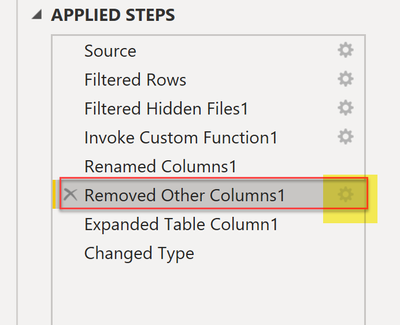
one of the automatically created steps removes this column. I you click on the gearwheel, a dialogue will open that allows you to check all the columns you want to keep:

ImkeF_0-1669581869038.png


Imke Feldmann (The BIccountant)

If you liked my solution, please give it a thumbs up. And if I did answer your question, please mark this post as a solution. Thanks!

How to integrate M-code into your solution -- How to get your questions answered quickly -- How to provide sample data -- Check out more PBI- learning resources here -- Performance Tipps for M-queries

View solution in original post

2 REPLIES 2
laganlee
Helper II
Helper II

Thanks a lot ImkeF!

That is so simple - much appreciated.


ImkeF
Community Champion
Community Champion

Hello @laganlee ,
one of the automatically created steps removes this column. I you click on the gearwheel, a dialogue will open that allows you to check all the columns you want to keep:

ImkeF_0-1669581869038.png


Imke Feldmann (The BIccountant)

If you liked my solution, please give it a thumbs up. And if I did answer your question, please mark this post as a solution. Thanks!

How to integrate M-code into your solution -- How to get your questions answered quickly -- How to provide sample data -- Check out more PBI- learning resources here -- Performance Tipps for M-queries

Helpful resources

Announcements
Power BI DataViz World Championships

Power BI Dataviz World Championships

The Power BI Data Visualization World Championships is back! Get ahead of the game and start preparing now!

December 2025 Power BI Update Carousel

Power BI Monthly Update - December 2025

Check out the December 2025 Power BI Holiday Recap!

FabCon Atlanta 2026 carousel

FabCon Atlanta 2026

Join us at FabCon Atlanta, March 16-20, for the ultimate Fabric, Power BI, AI and SQL community-led event. Save $200 with code FABCOMM.

Top Solution Authors