
Don't miss your chance to take the Fabric Data Engineer (DP-600) exam for FREE! Find out how by watching the DP-600 session on-demand now through April 28th.
Learn moreJoin the FabCon + SQLCon recap series. Up next: Power BI, Real-Time Intelligence, IQ and AI, and Data Factory take center stage. All sessions are available on-demand after the live show. Register now
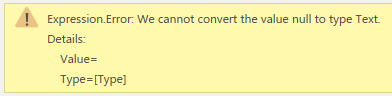
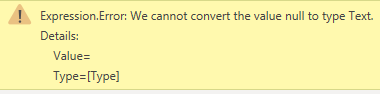
I have a reasonably complex workflow with several tables and am getting the error below. Unfortunately, I cannot share the workbook or data.
I checked this thread but couldn't find a solution: https://community.powerbi.com/t5/Power-Query/Expression-Error-We-cannot-convert-the-value-null-to-ty...
This error appeared after one change on "Metadata-Responses", where I replaced the 0 values will null (so it now has values 1-5 and null). This then caused the error two tables down the line, even thought the field that is altered in the first table is only used there and then deleted in the following table. The error appears on the very last step, which is a pivot
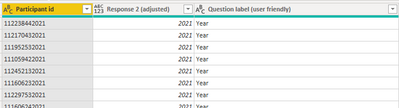
Data that the pivot is performed on
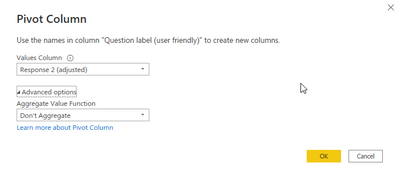
Pivot settings
Solved! Go to Solution.
Hi @Anonymous ,
According to your description, I reproduce your problem.
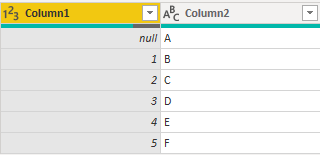
If there is null in the column, after pivot the column, the same error occures.
I think it's because after pivot, values in Column1 will be column names, but the null value cannot be used in column name.
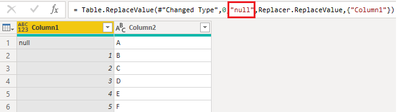
As a workaroud, in the replace value step, replace 0 with text "null" instead of null, directly add Double quotes “” to null in the code.
After pivot, the error disappears.
I attach my sample below for your reference.
Best Regards,
Community Support Team _ kalyj
If this post helps, then please consider Accept it as the solution to help the other members find it more quickly.
Hi @Anonymous ,
According to your description, I reproduce your problem.
If there is null in the column, after pivot the column, the same error occures.
I think it's because after pivot, values in Column1 will be column names, but the null value cannot be used in column name.
As a workaroud, in the replace value step, replace 0 with text "null" instead of null, directly add Double quotes “” to null in the code.
After pivot, the error disappears.
I attach my sample below for your reference.
Best Regards,
Community Support Team _ kalyj
If this post helps, then please consider Accept it as the solution to help the other members find it more quickly.
Check out the April 2026 Power BI update to learn about new features.
If you have recently started exploring Fabric, we'd love to hear how it's going. Your feedback can help with product improvements.
A new Power BI DataViz World Championship is coming this June! Don't miss out on submitting your entry.
| User | Count |
|---|---|
| 5 | |
| 4 | |
| 4 | |
| 4 | |
| 4 |