Join us at FabCon Atlanta from March 16 - 20, 2026, for the ultimate Fabric, Power BI, AI and SQL community-led event. Save $200 with code FABCOMM.
Register now!The Power BI Data Visualization World Championships is back! Get ahead of the game and start preparing now! Learn more
Hi,
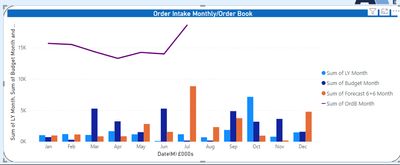
I have some financial data but to show the values in a column chart, I have to make them "Sum of ....", so all my legends have Sum of at the start of them. If i use another measure, it values out at 1 for each month. How can I remove this so it is just LY Month, Budget Month etc..?
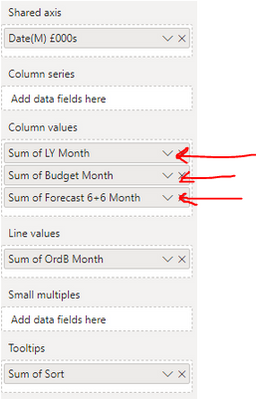
This is my visualisations field (Sum of Sort is my conditional column for ordering the months correctly):
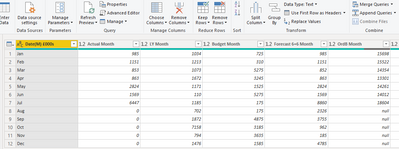
This is my Query Editor (in case it is just a formatting problem) with some of the variables, thanks
Solved! Go to Solution.
Hi @Anonymous ,
In the Column Values section where you've dragged the columns into, just double-click on the column names there and you can overwrite how they are displayed.
FWIW, generally-accepted best practice is that you should always create explicit measures for each of your calculations, even if it's just a basic sum of a column. For example:
LY Month = SUM(yourTable[LY Month])
Pete
Proud to be a Datanaut!
Hi @Anonymous ,
In the Column Values section where you've dragged the columns into, just double-click on the column names there and you can overwrite how they are displayed.
FWIW, generally-accepted best practice is that you should always create explicit measures for each of your calculations, even if it's just a basic sum of a column. For example:
LY Month = SUM(yourTable[LY Month])
Pete
Proud to be a Datanaut!
Ah very simple, great, thanks
The Power BI Data Visualization World Championships is back! Get ahead of the game and start preparing now!
| User | Count |
|---|---|
| 19 | |
| 10 | |
| 9 | |
| 7 | |
| 6 |