Join us at FabCon Atlanta from March 16 - 20, 2026, for the ultimate Fabric, Power BI, AI and SQL community-led event. Save $200 with code FABCOMM.
Register now!The Power BI Data Visualization World Championships is back! Get ahead of the game and start preparing now! Learn more
I have a table with 3 columns and I am bit confused with cleaning the data the dirty data is as follows:
Order ID category Amount
CA-2011-167199. Binders|Art. 5.4 | 31
CA-2011-149020. Tables|Binders. 17 |13
CA-2011-127614. Fasteners|Art. 6 | 3.6
After cleaning the data the data should look like this:
Order ID. Category. Amount
CA-2011-167199. Binders. 5.4
CA-2011-167199. Art. 31
CA-2011-149020. Tables. 17
CA-2011-149020. Binders 13
CA-2011-127614. Fasteners 6
CA-2011-127614. Art. 3.6
All suggestions are helpful thank you in advance
Solved! Go to Solution.
Hi @Anony_mous ,
How about this:
Before:
After:
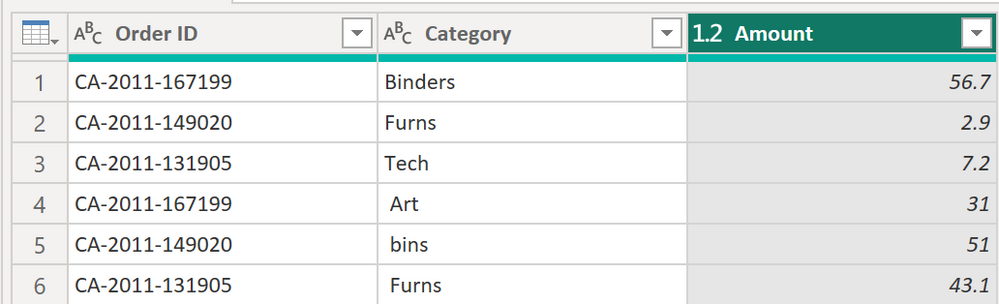
Here the code in Power Query M that you can paste into the advanced editor (if you do not know, how to exactly do this, please check out this quick walkthrough)
let
Source = Table.FromRows(Json.Document(Binary.Decompress(Binary.FromText("Xcs7DoAgFETRrRhqJDwQySvRxBXYERs/iTYUqJ2Ld7QylidzJ0bRhtJoopJqT8xCimZL85L34ipCPmBXKw9YEoP85BVrozF3Z05PPG5pB41iwP1iS6wd1n6ZVszvB/TKQJVVyIcb", BinaryEncoding.Base64), Compression.Deflate)), let _t = ((type nullable text) meta [Serialized.Text = true]) in type table [#"Order ID" = _t, Category = _t, Amount = _t]),
#"Split Column by Delimiter 1" = Table.SplitColumn(Source, "Category", Splitter.SplitTextByDelimiter(" | ", QuoteStyle.Csv), {"Category", "Category.2"}),
#"Split Column by Delimiter 2" = Table.SplitColumn(#"Split Column by Delimiter 1", "Amount", Splitter.SplitTextByDelimiter(" | ", QuoteStyle.Csv), {"Amount", "Amount.2"}),
#"Removed Other Columns 1" = Table.SelectColumns(#"Split Column by Delimiter 2",{"Order ID", "Category.2", "Amount.2"}),
#"Renamed Columns" = Table.RenameColumns(#"Removed Other Columns 1",{{"Category.2", "Category"}, {"Amount.2", "Amount"}}),
#"Removed Other Columns 2" = Table.SelectColumns(#"Split Column by Delimiter 2",{"Order ID", "Category", "Amount"}),
#"Appended Query" = Table.Combine({#"Removed Other Columns 2", #"Renamed Columns"}),
#"Changed Type" = Table.TransformColumnTypes(#"Appended Query",{{"Amount", type number}})
in
#"Changed Type"
Let me know if this works for you 🙂
/Tom
https://www.tackytech.blog/
https://www.instagram.com/tackytechtom/
| Did I answer your question❓➡️ Please, mark my post as a solution ✔️ |
| Also happily accepting Kudos 🙂 |
| Feel free to connect with me on LinkedIn! | |
| #proudtobeasuperuser | |
Hi @Anony_mous ,
How about this:
Before:
After:
Here the code in Power Query M that you can paste into the advanced editor (if you do not know, how to exactly do this, please check out this quick walkthrough)
let
Source = Table.FromRows(Json.Document(Binary.Decompress(Binary.FromText("Xcs7DoAgFETRrRhqJDwQySvRxBXYERs/iTYUqJ2Ld7QylidzJ0bRhtJoopJqT8xCimZL85L34ipCPmBXKw9YEoP85BVrozF3Z05PPG5pB41iwP1iS6wd1n6ZVszvB/TKQJVVyIcb", BinaryEncoding.Base64), Compression.Deflate)), let _t = ((type nullable text) meta [Serialized.Text = true]) in type table [#"Order ID" = _t, Category = _t, Amount = _t]),
#"Split Column by Delimiter 1" = Table.SplitColumn(Source, "Category", Splitter.SplitTextByDelimiter(" | ", QuoteStyle.Csv), {"Category", "Category.2"}),
#"Split Column by Delimiter 2" = Table.SplitColumn(#"Split Column by Delimiter 1", "Amount", Splitter.SplitTextByDelimiter(" | ", QuoteStyle.Csv), {"Amount", "Amount.2"}),
#"Removed Other Columns 1" = Table.SelectColumns(#"Split Column by Delimiter 2",{"Order ID", "Category.2", "Amount.2"}),
#"Renamed Columns" = Table.RenameColumns(#"Removed Other Columns 1",{{"Category.2", "Category"}, {"Amount.2", "Amount"}}),
#"Removed Other Columns 2" = Table.SelectColumns(#"Split Column by Delimiter 2",{"Order ID", "Category", "Amount"}),
#"Appended Query" = Table.Combine({#"Removed Other Columns 2", #"Renamed Columns"}),
#"Changed Type" = Table.TransformColumnTypes(#"Appended Query",{{"Amount", type number}})
in
#"Changed Type"
Let me know if this works for you 🙂
/Tom
https://www.tackytech.blog/
https://www.instagram.com/tackytechtom/
| Did I answer your question❓➡️ Please, mark my post as a solution ✔️ |
| Also happily accepting Kudos 🙂 |
| Feel free to connect with me on LinkedIn! | |
| #proudtobeasuperuser | |
The Power BI Data Visualization World Championships is back! Get ahead of the game and start preparing now!
Check out the November 2025 Power BI update to learn about new features.