cancel
Showing results for 
Search instead for 
Did you mean: 

Join the FabCon + SQLCon recap series. Up next: Power BI, Real-Time Intelligence, IQ and AI, and Data Factory take center stage. All sessions are available on-demand after the live show. Register now

Reply
KMichael99
Frequent Visitor

Changing Data Source

Hi,


I currently have 19 Google Sheets workbooks connected to Power Bi, but am looking to transfer these across to Microsoft Excel without changing any visualisations. 


I thought it would be as easy as changing the data source settings, but this option isn't available. I've read online that I will have to connect each new Excel workbook and can copy across the whole Advanced Editor script to apply the same steps. However, as this is a new data source, this will break the visualisations and DAX measures I have... which there are far too many for me to want to do this!


Can anyone think of a work around for this? 


Thanks

1 ACCEPTED SOLUTION
olgad
Resident Rockstar
Resident Rockstar

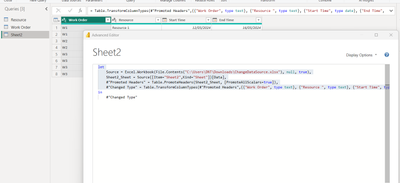
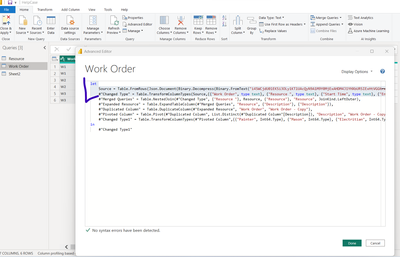
Hi, you connect to excel and copy from excel Advanced Editor to your existing query, this way you dont break anything. 

Step 1 connect to excel, copy the part till in

olgad_0-1709643611557.png

Step 2, go to your existing table connected to google sheet, replace, dont forget comma before your other steps

olgad_1-1709643703266.png


if you copy the steps from your query to new excel query, you will break everything, but the other way around, copying the datasource of excel to your existing query will not break anything.


DID I ANSWER YOUR QUESTION? PLEASE MARK MY POST AS A SOLUTION! APPRECIATE YOUR KUDO/LIKE!
PROUD TO BE A SUPER USER!
Best Stories, Interesting Cases: PowerBI Storytime Newsletter
Linkedin Profile: Linkedin
YouTube Channel: PowerBI Storytime

View solution in original post

1 REPLY 1
olgad
Resident Rockstar
Resident Rockstar

Hi, you connect to excel and copy from excel Advanced Editor to your existing query, this way you dont break anything. 

Step 1 connect to excel, copy the part till in

olgad_0-1709643611557.png

Step 2, go to your existing table connected to google sheet, replace, dont forget comma before your other steps

olgad_1-1709643703266.png


if you copy the steps from your query to new excel query, you will break everything, but the other way around, copying the datasource of excel to your existing query will not break anything.


DID I ANSWER YOUR QUESTION? PLEASE MARK MY POST AS A SOLUTION! APPRECIATE YOUR KUDO/LIKE!
PROUD TO BE A SUPER USER!
Best Stories, Interesting Cases: PowerBI Storytime Newsletter
Linkedin Profile: Linkedin
YouTube Channel: PowerBI Storytime

Helpful resources

Announcements
April Power BI Update Carousel

Power BI Monthly Update - April 2026

Check out the April 2026 Power BI update to learn about new features.

New to Fabric survey Carousel

New to Fabric Survey

If you have recently started exploring Fabric, we'd love to hear how it's going. Your feedback can help with product improvements.

Power BI DataViz World Championships carousel

Power BI DataViz World Championships - June 2026

A new Power BI DataViz World Championship is coming this June! Don't miss out on submitting your entry.

FabCon and SQLCon Highlights Carousel

FabCon & SQLCon Highlights

Experience the highlights from FabCon & SQLCon, available live and on-demand starting April 14th.