This is best Fabric, Power BI, SQL and AI community event. How do we know? The last event sold out! Save €200 with code FABCMTY200.
Register nowJuly 28 - August 9 | Final Round of the Power BI Dataviz World Championships. This is your chance. Learn more
Hi,
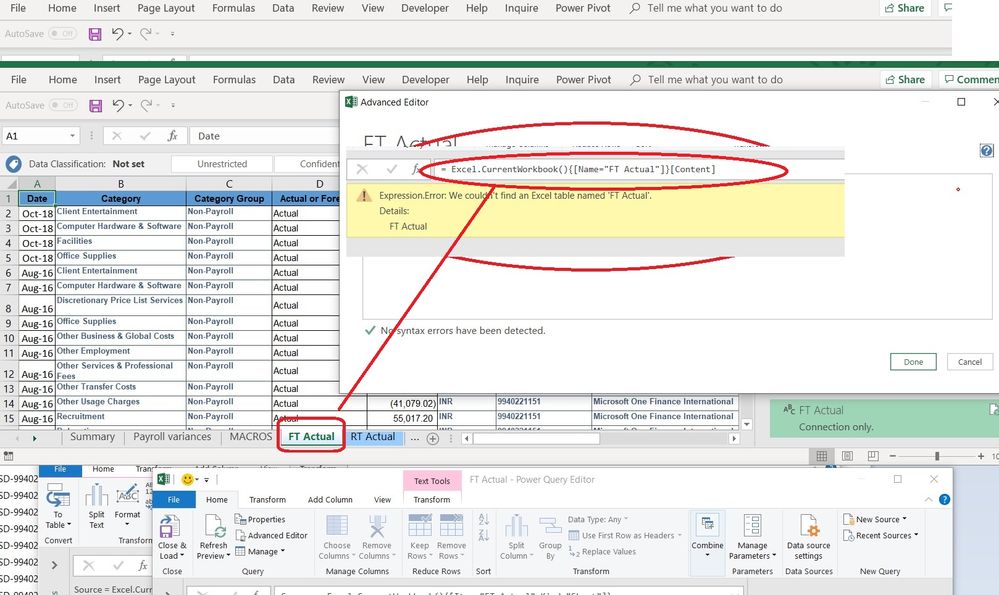
I need help to change in advance editor in power query the source so it can get the data from an Excel tab called "FT Actual" that is in the current workbook. (.NOT FROM TABLE).
In somehow I think I need to use some of these but not sure how to combine them properly or what I missing :
Source = Excel.CurrentWorkbook() +
{[Name="FT Actual"]}[Content] or Kind="Sheet"]}[Data],
Note: I don´t need to create the normal get data from query, this is a special requirement that I need to solve in order to take the data from the current workbook and the specific sheet.
Any ideas ?
Thanks
Solved! Go to Solution.
Hi @cristianml ,
You'll need something like this to get the sheet names and then navigate to the specific sheet you need.
From what I understand you can't acheive this using Excel.CurrentWorkbook().
let
Source = Excel.Workbook(File.Contents("YourFilePath"), null, true),
#"Filtered Rows" = Table.SelectRows(Source, each ([Kind] = "Sheet")),
#"This Sheet_Sheet" = #"Filtered Rows"{[Item="This Sheet",Kind="Sheet"]}[Data]
in
#"This Sheet_Sheet"
Hope this helps point you in the right direction.
Regards,
Kim
| Have I solved your problem? Please click Accept as Solution so I don't keep coming back to this post, oh yeah, others may find it useful also ;). |
Hi @cristianml ,
You'll need something like this to get the sheet names and then navigate to the specific sheet you need.
From what I understand you can't acheive this using Excel.CurrentWorkbook().
let
Source = Excel.Workbook(File.Contents("YourFilePath"), null, true),
#"Filtered Rows" = Table.SelectRows(Source, each ([Kind] = "Sheet")),
#"This Sheet_Sheet" = #"Filtered Rows"{[Item="This Sheet",Kind="Sheet"]}[Data]
in
#"This Sheet_Sheet"
Hope this helps point you in the right direction.
Regards,
Kim
| Have I solved your problem? Please click Accept as Solution so I don't keep coming back to this post, oh yeah, others may find it useful also ;). |
Hi @KNP ,
thanks ! works perfect ! now I like to solved the other part that is change the path so when i share the file to other user can use it without change the hardcoded path:
File.Contents("C:\Users\cristian\Desktop\Actual vs Forecast\Macro Actual vs Forecast.xlsm")
but I will try this with filepath from cell value. 🙂
Thanks !!
This is what I do to change paths easily:
1. Add a tab to the workbook
2. Put the path in a cell and name that cell as "dir"
3. Load it to power query, the query should be named "dir"
4. Convert to List
5. Add {0} at the end of the previous step, that will conver the list to a value by taking yus the first value in the list
6. Replace "YourFilePath"
Excel.Workbook(File.Contents("YourFilePath"), null, true)with: (dir &"\filename.xlsx")
7. Now the path is dynamic, you can edit it in Excel and it will update in power query
Join us in Barcelona for FabCon and SQLCon, the Fabric, Power BI, SQL, and AI community event. Save €200 with code FABCMTY200.
If you love stickers, then you will definitely want to check out our community sticker challenge, Barcelona edition!
Check out the July 2026 Power BI update to learn about new features.