Don't miss your chance to take the Fabric Data Engineer (DP-600) exam for FREE! Find out how by attending the DP-600 session on April 23rd (pacific time), live or on-demand.
Learn moreNext up in the FabCon + SQLCon recap series: The roadmap for Microsoft SQL and Maximizing Developer experiences in Fabric. All sessions are available on-demand after the live show. Register now
Hi all,
I hope all of you are having a great time. I need a help with Power Query.
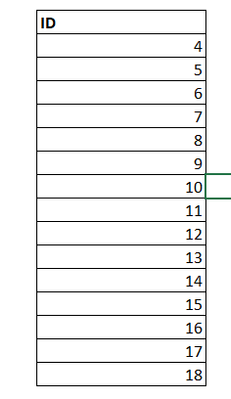
I have the following Column.
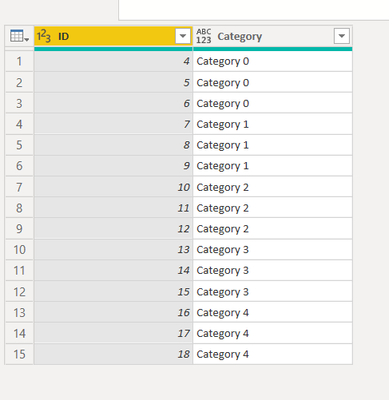
I want to add a Category Column that depends on row as below. For example, the First 3 rows Category 1, row 3 to 6 Category 2 and so on. A business rule is that the category should increase after every 3 rows.
How can I achieve this in Power Query?
Thanks in Advance
Solved! Go to Solution.
Simply adding 1 would solve it
Table.AddColumn(Source, "Category", each "Category " & Number.ToText(Number.RoundDown(List.PositionOf(Source[ID],[ID])/3)+1))
let
Source = Table.FromRows(Json.Document(Binary.Decompress(Binary.FromText("i45WMlGK1YlWMgWTZmDSHExagElLMGloAKEMIZSRUmwsAA==", BinaryEncoding.Base64), Compression.Deflate)), let _t = ((type nullable text) meta [Serialized.Text = true]) in type table [ID = _t]),
#"Changed Type" = Table.TransformColumnTypes(Source,{{"ID", Int64.Type}}),
Custom1 = Table.AddColumn(#"Changed Type", "New", each "Category " & Text.From(Number.IntegerDivide([ID]-1, 3)))
in
Custom1
| Thanks to the great efforts by MS engineers to simplify syntax of DAX! Most beginners are SUCCESSFULLY MISLED to think that they could easily master DAX; but it turns out that the intricacy of the most frequently used RANKX() is still way beyond their comprehension! |
DAX is simple, but NOT EASY! |
Hi,
Paste this into your next step and replace Source with previous one.
Categorized = Table.AddColumn(Source, "Category", each "Category " & Number.ToText(Number.RoundDown(List.PositionOf(Source[ID],[ID])/3)))
It started from 0 instead of 1 when I used the code.
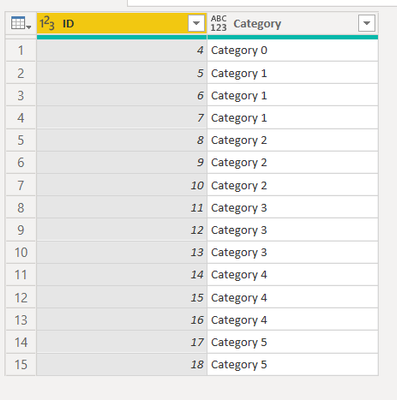
When I included Roundup, it came as follows:
We were close enough
Thankyou,
Simply adding 1 would solve it
Table.AddColumn(Source, "Category", each "Category " & Number.ToText(Number.RoundDown(List.PositionOf(Source[ID],[ID])/3)+1))
If you have recently started exploring Fabric, we'd love to hear how it's going. Your feedback can help with product improvements.
A new Power BI DataViz World Championship is coming this June! Don't miss out on submitting your entry.
Experience the highlights from FabCon & SQLCon, available live and on-demand starting April 14th.
| User | Count |
|---|---|
| 5 | |
| 3 | |
| 3 | |
| 3 | |
| 2 |
| User | Count |
|---|---|
| 7 | |
| 5 | |
| 5 | |
| 5 | |
| 4 |