Join us at FabCon Atlanta from March 16 - 20, 2026, for the ultimate Fabric, Power BI, AI and SQL community-led event. Save $200 with code FABCOMM.
Register now!Vote for your favorite vizzies from the Power BI Dataviz World Championship submissions. Vote now!
Hi all,
I hope all of you are having a great time. I need a help with Power Query.
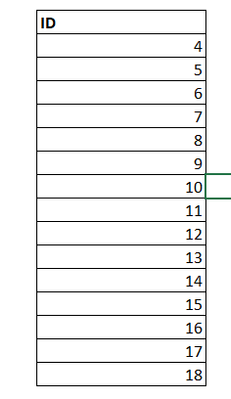
I have the following Column.
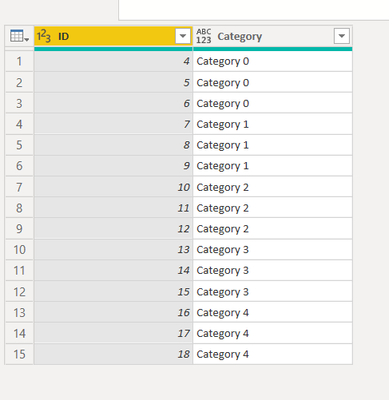
I want to add a Category Column that depends on row as below. For example, the First 3 rows Category 1, row 3 to 6 Category 2 and so on. A business rule is that the category should increase after every 3 rows.
How can I achieve this in Power Query?
Thanks in Advance
Solved! Go to Solution.
Simply adding 1 would solve it
Table.AddColumn(Source, "Category", each "Category " & Number.ToText(Number.RoundDown(List.PositionOf(Source[ID],[ID])/3)+1))
let
Source = Table.FromRows(Json.Document(Binary.Decompress(Binary.FromText("i45WMlGK1YlWMgWTZmDSHExagElLMGloAKEMIZSRUmwsAA==", BinaryEncoding.Base64), Compression.Deflate)), let _t = ((type nullable text) meta [Serialized.Text = true]) in type table [ID = _t]),
#"Changed Type" = Table.TransformColumnTypes(Source,{{"ID", Int64.Type}}),
Custom1 = Table.AddColumn(#"Changed Type", "New", each "Category " & Text.From(Number.IntegerDivide([ID]-1, 3)))
in
Custom1
| Thanks to the great efforts by MS engineers to simplify syntax of DAX! Most beginners are SUCCESSFULLY MISLED to think that they could easily master DAX; but it turns out that the intricacy of the most frequently used RANKX() is still way beyond their comprehension! |
DAX is simple, but NOT EASY! |
Hi,
Paste this into your next step and replace Source with previous one.
Categorized = Table.AddColumn(Source, "Category", each "Category " & Number.ToText(Number.RoundDown(List.PositionOf(Source[ID],[ID])/3)))
It started from 0 instead of 1 when I used the code.
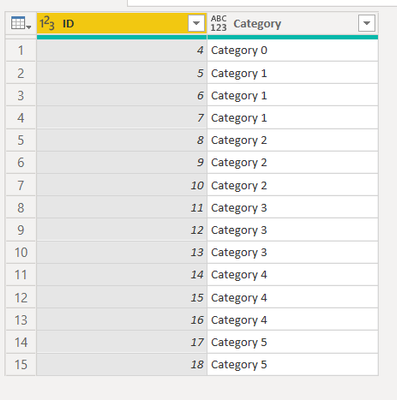
When I included Roundup, it came as follows:
We were close enough
Thankyou,
Simply adding 1 would solve it
Table.AddColumn(Source, "Category", each "Category " & Number.ToText(Number.RoundDown(List.PositionOf(Source[ID],[ID])/3)+1))
Vote for your favorite vizzies from the Power BI World Championship submissions!
If you love stickers, then you will definitely want to check out our Community Sticker Challenge!
Check out the January 2026 Power BI update to learn about new features.
| User | Count |
|---|---|
| 11 | |
| 10 | |
| 6 | |
| 6 | |
| 5 |