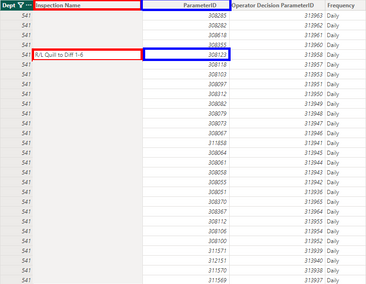
I have two tables I am trying to work with, one that has many recorded data values for an inspection/id, and I also have a list of all inspection/id for each dept. The left image will be called 'Data' and the right image will be called 'List'. 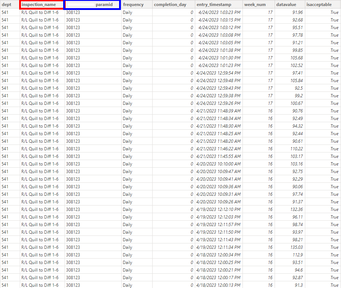
I am trying to build a table that displays an overview of the inspections as the week goes on but am facing an issue with my numbers for various weeks.  In order to calculate the "Expected Inspections" I am using the 'List' table to count how many inspections there are in each department, and then multiplying by 5 to account for the daily frequency. Department 541 should read '140' and 571 '110' for a total of '250'. The rest of the table uses the 'Data' table to aggregate datavalues based on their classification (Laid Off, N/A). The table shown in this image is filtered to week 17 (week_num is stored in 'Data'). When I filter to different weeks, the '245' changes to different numbers like '230' or '220' for example.
I believe this is because for whichever week I am filtered too, there is an inspection name missing in the 'Data' table as it wasn't ran that week (it should've been ran) so it isn't being counted in the 'List' table for my "Expected Inspections". The relationship from 'Data' and to 'List' and is between the two ParamID columns with a Many to One cardinality and cross filter direction as both.
Does anyone have any fixes for this? I am looking to have the "Expected Inspections" read 250 at all times, and right now I can't get it to do that as detailed above. Thank you in advance!


