This time we’re going bigger than ever. Fabric, Power BI, SQL, AI and more. We're covering it all. You won't want to miss it.
Learn moreJoin the FabCon + SQLCon recap series. Up next: Power BI, Real-Time Intelligence, IQ and AI, and Data Factory take center stage. All sessions are available on-demand after the live show. Register now
Hello,
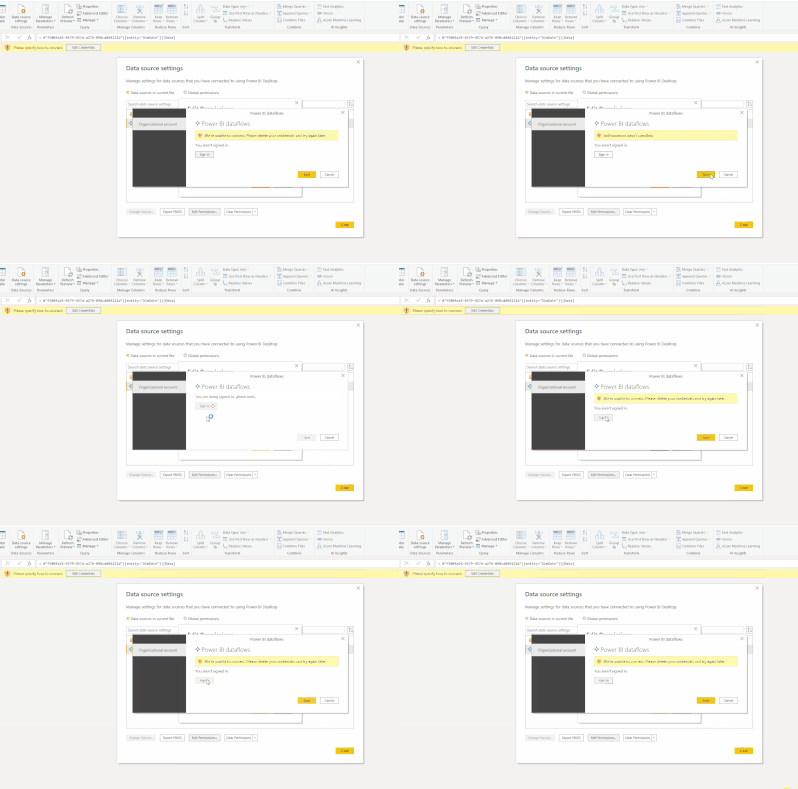
Whenever I try to sign in using my organizational account for access to my dataflows, I get a very quick popup saying "signed out of all accounts" and then the error "We're unable to connect. Please delete your credentials and try again later.".
I have tried clearing the permissions in my data source settings, but it doesn't work.
Please help!
Solved! Go to Solution.
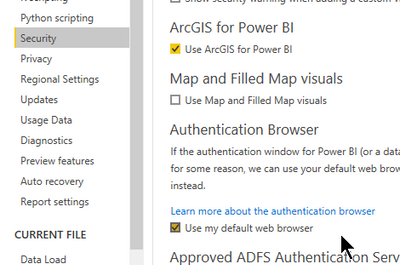
Try enabling "Use my default web browser" under the Security options, it should give you more time to understand what's going on with the authentication flow:
Awesome, now it works!
Check out the April 2026 Power BI update to learn about new features.
If you have recently started exploring Fabric, we'd love to hear how it's going. Your feedback can help with product improvements.
A new Power BI DataViz World Championship is coming this June! Don't miss out on submitting your entry.
| User | Count |
|---|---|
| 3 | |
| 3 | |
| 3 | |
| 2 | |
| 2 |
| User | Count |
|---|---|
| 5 | |
| 4 | |
| 4 | |
| 4 | |
| 4 |