cancel
Showing results for 
Search instead for 
Did you mean: 

Learn from the best! Meet the four finalists headed to the FINALS of the Power BI Dataviz World Championships! Register now

Reply
Anonymous
Not applicable

Cannot convert to type List

I think my M needs a syntax adjustment, but I'm not sure where or how.


Here's the M:

let
Source = Json.Document(Web.Contents("https://apiURL/ACCOUNT_INFO?$top=2000",
    [Headers=
        [   
            #"ocp-apim-subscription-key" = Text.Combine({Subscription}),
            #"integrator-key" = Text.Combine({Integrator}),
            #"x-universal-refresh-token" = Text.Combine({Refresh}),
            #"x-universal-directive" = "x",
            #"respos-cache" = "false"
            ]]
        )
    ),
#"Converted to Table" = Record.ToTable(Source),
Value = #"Converted to Table"{0}[Value],
Custom1 = Table.FromList(Value, Splitter.SplitByNothing(), null, null, ExtraValues.Error),
#"Expanded Column1" = Table.ExpandRecordColumn(Custom1, "Column1",
    {"Account_ID", "Account_Title"}
    )
 
in

    #"Expanded Column1"

Here's the error:


Expression.Error: We cannot convert the value "https://host/$metada..." to type List.
Details:
Value=https://host/$metadata#ACCOUNT_INFO
Type=[Type]


When I'm told to "Go To Error," it seems the offending part is: 

Custom1 = Table.FromList(Value, Splitter.SplitByNothing(), null, null, ExtraValues.Error)


Any assistance would be appreciated. Thanks!

1 ACCEPTED SOLUTION
Anonymous
Not applicable

Closing this thread since I've resolved the issue.


Turns out, the problem was not with the syntax of the M, but with the fact that the API wasn't returning any records due to session expiration. After renewing the session, the API once again returned data, and the error went away without any change to the original M.


Sincere kudos to @Anonymous for the assist.

View solution in original post

3 REPLIES 3
Anonymous
Not applicable

I would try replacing:


Value = #"Converted to Table"{0}[Value],

With:


NewValue = #"Converted to Table"[Value],

 And then your next line would be:


Table.FromList(NewValue,...etc


--Nate

Anonymous
Not applicable

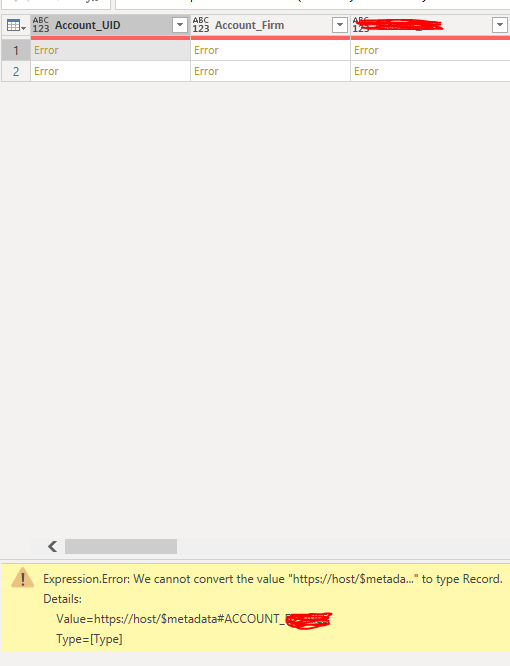
Thanks, but not sure I'm completely following. You're saying, just remove the {0}?


When I do, I get the results below:

cannotConvert.PNG

The error for cell 1 under "Account_UID" is shown in the image. 

The error for cell 2 under "Account_UID" is different, and says:


Expression.Error: We cannot convert a value of type List to type Record.
Details:
Value=[List]
Type=[Type]

Anonymous
Not applicable

Closing this thread since I've resolved the issue.


Turns out, the problem was not with the syntax of the M, but with the fact that the API wasn't returning any records due to session expiration. After renewing the session, the API once again returned data, and the error went away without any change to the original M.


Sincere kudos to @Anonymous for the assist.

Helpful resources

Announcements
Join our Fabric User Panel

Join our Fabric User Panel

Share feedback directly with Fabric product managers, participate in targeted research studies and influence the Fabric roadmap.

February Power BI Update Carousel

Power BI Monthly Update - February 2026

Check out the February 2026 Power BI update to learn about new features.

FabCon Atlanta 2026 carousel

FabCon Atlanta 2026

Join us at FabCon Atlanta, March 16-20, for the ultimate Fabric, Power BI, AI and SQL community-led event. Save $200 with code FABCOMM.

Top Solution Authors