cancel
Showing results for 
Search instead for 
Did you mean: 

The Power BI Data Visualization World Championships is back! Get ahead of the game and start preparing now! Learn more

Reply
HeliosOne
Frequent Visitor

Can I save inside content after Python RegEx

Hello!


I`m connecting to folder which contains multiply different .xlsx files. Every filename somewhere contains 20 digit account number. At first I need extract account number, recive some number based data from 'dimension table' and make some filtering. After that I want expand 'content' and start working with data inside those files.


That is how my folder looks: 
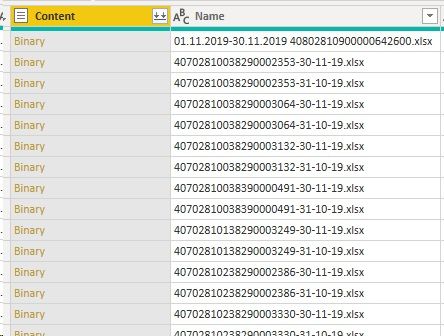
Input.jpg


I was unable to get steady result with 'column from examples' so I use small Python code to extract account numbers in my dataset.

# 'dataset' содержит входные данные для этого сценария
regex = r'(\d{20})'
dataset['Номер расчетного счета'] = dataset['Name'].str.extract(regex)

Code works well and returns dataset but in 'Value.Content' instead of previous content I recieve 'System.Byte' value.
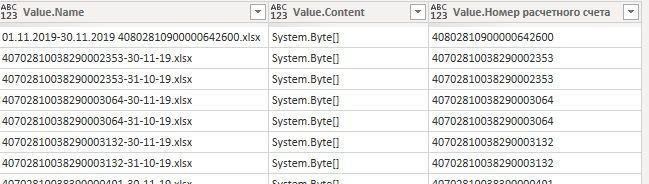
Output.jpg


It is important for me to make some filtering on regex`ed dataset before expanding 'content'. Is it possible to save all content in one query after regex?


P.S. There is workaround with doubling and merging queries but I would like to stay in one query. 


Thank you!

1 ACCEPTED SOLUTION
ImkeF
Community Champion
Community Champion

Hi @HeliosOne ,

to my knowledge, these "nested" columns will not survive a passage through Python.

So you have to parse out /expand the columns you need later before applying the Python-Script.


Imke Feldmann (The BIccountant)

If you liked my solution, please give it a thumbs up. And if I did answer your question, please mark this post as a solution. Thanks!

How to integrate M-code into your solution -- How to get your questions answered quickly -- How to provide sample data -- Check out more PBI- learning resources here -- Performance Tipps for M-queries

View solution in original post

2 REPLIES 2
Jimmy801
Community Champion
Community Champion

Hello
I don't know what exactly regex is.
However I'm an excel expert and i can tell you that you can extract data in all dynamically way you need. So stay with M and you are on the safe side
Have a nice time
Jimmy
ImkeF
Community Champion
Community Champion

Hi @HeliosOne ,

to my knowledge, these "nested" columns will not survive a passage through Python.

So you have to parse out /expand the columns you need later before applying the Python-Script.


Imke Feldmann (The BIccountant)

If you liked my solution, please give it a thumbs up. And if I did answer your question, please mark this post as a solution. Thanks!

How to integrate M-code into your solution -- How to get your questions answered quickly -- How to provide sample data -- Check out more PBI- learning resources here -- Performance Tipps for M-queries

Helpful resources

Announcements
Power BI DataViz World Championships

Power BI Dataviz World Championships

The Power BI Data Visualization World Championships is back! Get ahead of the game and start preparing now!

December 2025 Power BI Update Carousel

Power BI Monthly Update - December 2025

Check out the December 2025 Power BI Holiday Recap!

FabCon Atlanta 2026 carousel

FabCon Atlanta 2026

Join us at FabCon Atlanta, March 16-20, for the ultimate Fabric, Power BI, AI and SQL community-led event. Save $200 with code FABCOMM.