Hello everyone,
First of all, I would like to thank jborro and artemus for the great help that they contributed in my other post. I think I am nearly there and I am posting this because this would be a different Power Query question.
I have learnt how to generate a record of my custom-made function names using the following, where GoogleXXXProcessors are the functions I made:
Output =
    [
        GoogleGSMDailyProcessor = (fileName as text, publisherName as text) => GoogleGSMDailyProcessor,
        GoogleGSMHourProcessor = (fileName as text, publisherName as text) => GoogleGSMHourProcessor,
        GoogleGDNDailyProcessor = (fileName as text, publisherName as text) => GoogleGDNDailyProcessor,
        GoogleGDNAdGroupProcessor = (fileName as text, publisherName as text) => GoogleGDNAdGroupProcessor,
        GoogleGDNSizeProcessor = (fileName as text, publisherName as text) => GoogleGDNSizeProcessor
    ]
As #shared will not work in Power BI Service, I need to manually build this record.
Original code:
#"Invoked Custom Function" =
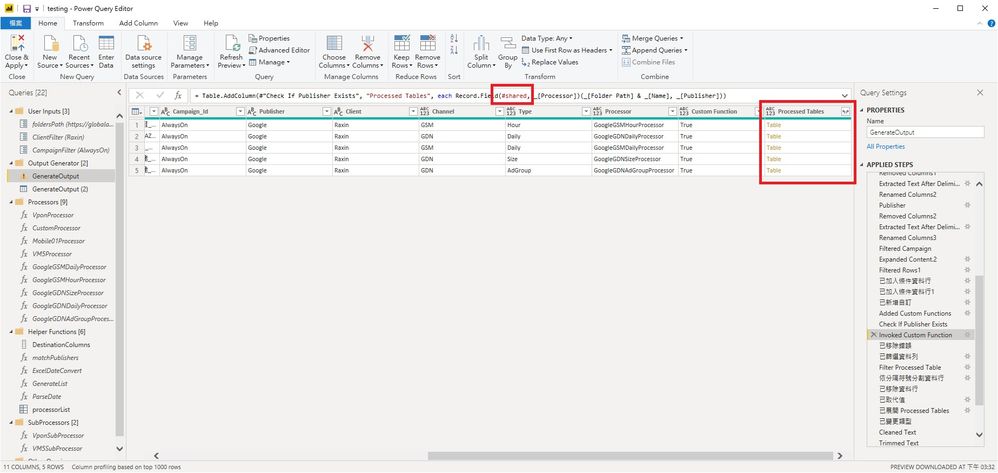
        Table.AddColumn(#"Previous Step", "Processed Tables", each Record.Field(#shared, _[Processor])(_[Folder Path] & _[Name], _[Publisher]))
Then I will get a column with Table as values:
Code using manually-created record Output:
#"Invoked Custom Function" =
        Table.AddColumn(#"Previous Step", "Processed Tables", each Record.Field(Output, _[Processor])(_[Folder Path] & _[Name], _[Publisher]))
Then I will get a column with Function as values:
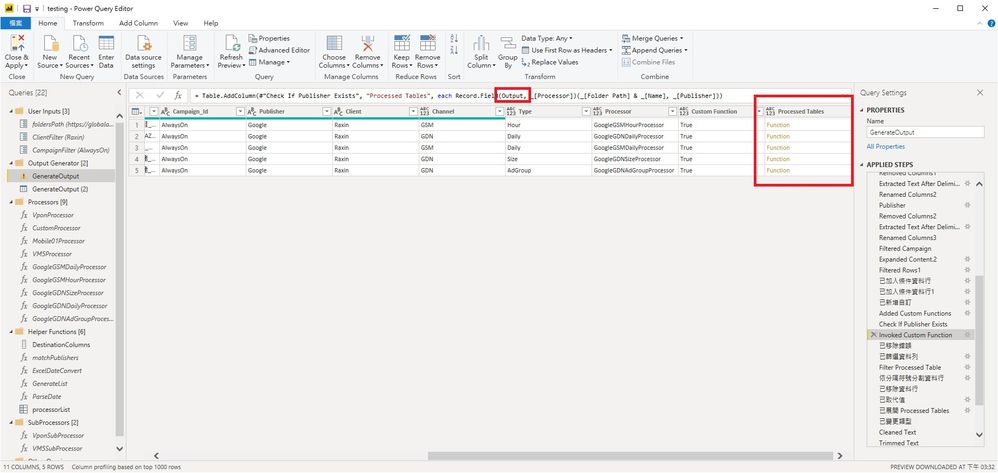
What should I do to make the value of this column to table as it should be?
Thank you so much for your help.
Best regards,
David


