Learn from the best! Meet the four finalists headed to the FINALS of the Power BI Dataviz World Championships! Register now
Hello everyone,
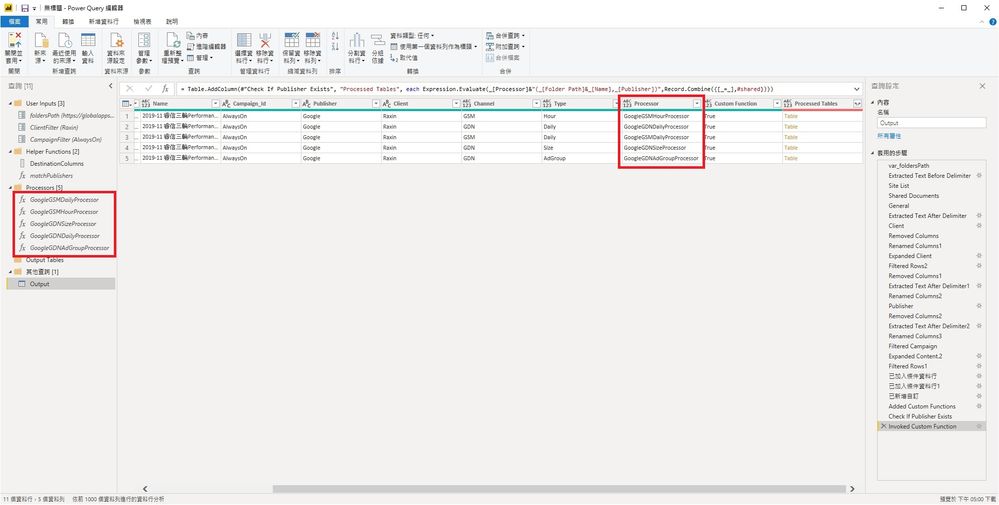
I would like to add a new column using pre-made functions with 2 parameters, and the name of functions are in a column.
I used Expression.Evaluate + Record.Combine to accomplish so previously. However, as #shared only works in Power Query but does not work in Power BI, I need other solutions.
Could someone please help me with the correct M expression?
Thank you so much for your time and help.
Just found others' solution.
First, turn the functions that I need into a list then use that list.
var_Shared = #shared,
ProcessorFunctionNames = List.Select(Record.FieldNames(var_Shared),each Text.EndsWith(_,"Processor")),
Result = List.Transform(ProcessorFunctionNames, each _ & " = " & _ & ","),
Original expression:
Expression.Evaluate( _[Processor] & "( _[Folder Path] & _[Name] , _[Publisher] )", Record.Combine({[_=_],#shared}))
New expression:
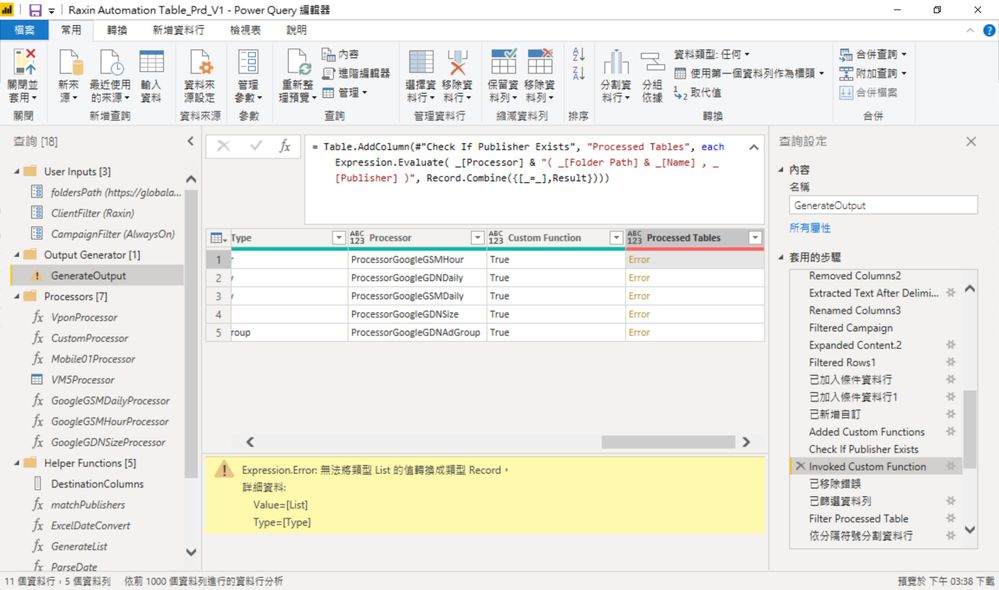
Expression.Evaluate( _[Processor] & "( _[Folder Path] & _[Name] , _[Publisher] )", Record.Combine({[_=_],Result}))
However, I am getting an expression error "Cannot turn values of List type into Record type.
Could anyone please help me with this line? Thank you very much.
If you have recently started exploring Fabric, we'd love to hear how it's going. Your feedback can help with product improvements.
A new Power BI DataViz World Championship is coming this June! Don't miss out on submitting your entry.
Share feedback directly with Fabric product managers, participate in targeted research studies and influence the Fabric roadmap.
| User | Count |
|---|---|
| 6 | |
| 4 | |
| 3 | |
| 2 | |
| 2 |
| User | Count |
|---|---|
| 11 | |
| 10 | |
| 8 | |
| 7 | |
| 7 |