cancel
Showing results for 
Search instead for 
Did you mean: 

Learn from the best! Meet the four finalists headed to the FINALS of the Power BI Dataviz World Championships! Register now

Reply
primolee
Helper V
Helper V

Calling a function and function name is in a data row

Hello everyone,


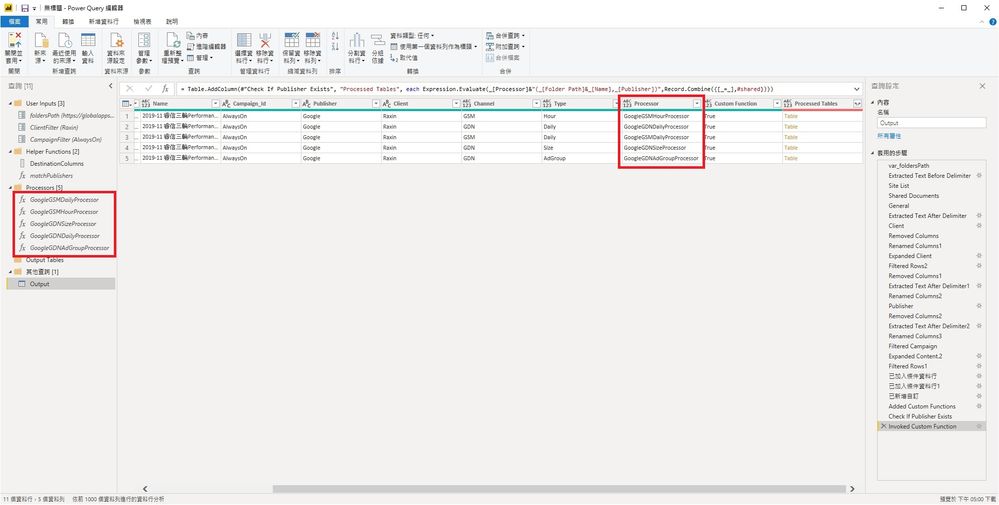
I would like to add a new column using pre-made functions with 2 parameters, and the name of functions are in a column.


I used Expression.Evaluate + Record.Combine to accomplish so previously.  However, as #shared only works in Power Query but does not work in Power BI, I need other solutions.


Could someone please help me with the correct M expression?


Thank you so much for your time and help.

Expression.jpg

1 REPLY 1
primolee
Helper V
Helper V

Just found others' solution.


First, turn the functions that I need into a list then use that list.


var_Shared = #shared,
ProcessorFunctionNames = List.Select(Record.FieldNames(var_Shared),each Text.EndsWith(_,"Processor")),
Result = List.Transform(ProcessorFunctionNames, each _ & " = " & _ & ","),


Original expression:

Expression.Evaluate( _[Processor] & "( _[Folder Path] & _[Name] , _[Publisher] )", Record.Combine({[_=_],#shared}))


New expression:

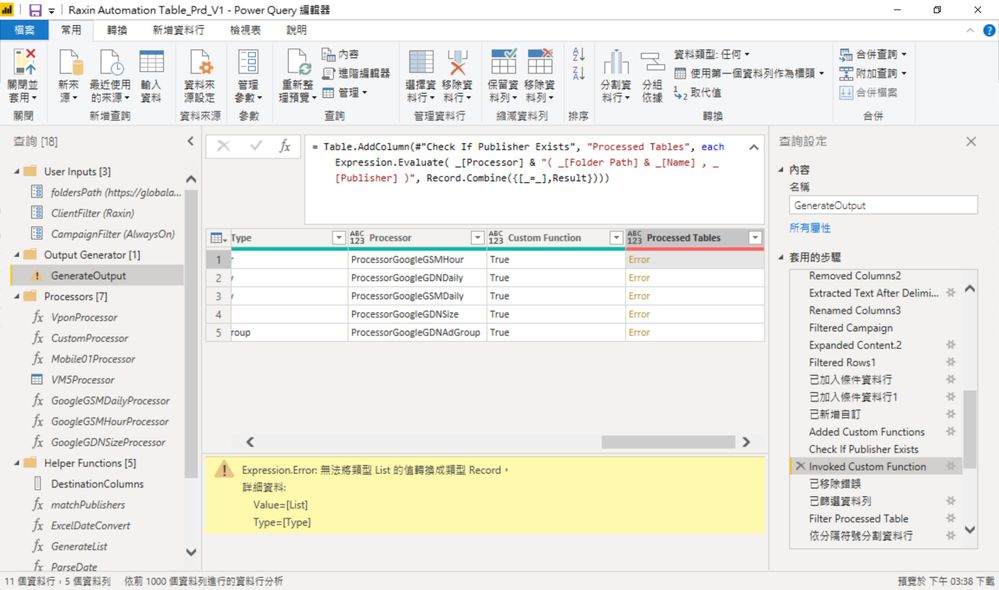
Expression.Evaluate( _[Processor] & "( _[Folder Path] & _[Name] , _[Publisher] )", Record.Combine({[_=_],Result}))


However, I am getting an expression error "Cannot turn values of List type into Record type.

temp.jpg


Could anyone please help me with this line?  Thank you very much.

Helpful resources

Announcements
Join our Fabric User Panel

Join our Fabric User Panel

Share feedback directly with Fabric product managers, participate in targeted research studies and influence the Fabric roadmap.

February Power BI Update Carousel

Power BI Monthly Update - February 2026

Check out the February 2026 Power BI update to learn about new features.

FabCon Atlanta 2026 carousel

FabCon Atlanta 2026

Join us at FabCon Atlanta, March 16-20, for the ultimate Fabric, Power BI, AI and SQL community-led event. Save $200 with code FABCOMM.

Top Solution Authors