
Get certified for free when you join Fabric Data Days 2026 and dive into Fabric, Power BI, SQL, AI, and other essential data skills.
Join nowJuly 7 - July 17 | Round 2 of the Power BI Dataviz World Championships. Don't miss your chance! Learn more
I have a table with 4 columns as shown below:
I also created 2 calculated columns which a) gives me a 1 for the LatestDate in the dataset (April 2021) and then b) gives me a 1 for the LatestDateMinusOneYear in the dataset (April 2020).
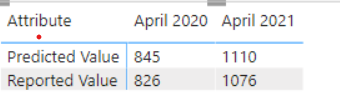
I created a matrix so far and it looks like this (I am using the measures I created (LastestDate and LatestDateMinusOneYear) as the filters.
I would like to calculate the percent change for the ROW for Predicted Value and for the Reported Value for each State. How can I go about this?
Any assistance would be appreciated!
Solved! Go to Solution.
Hi @natasha519
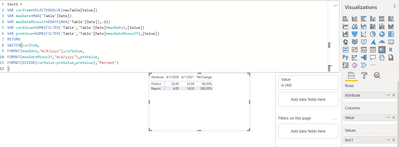
If I understand correctly, you only look at the MaxDate and MaxDateMinus1Year, then you want to put the values and percent change in the same matrix? Here is one way, file attached
I got the dummy data,
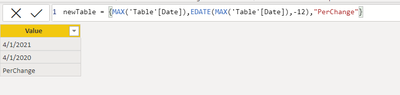
created a new table as the custom column
Thanks! Im not understanding the 'newTable' that you created and the purpose of it?
Hi @natasha519
If I understand correctly, you only look at the MaxDate and MaxDateMinus1Year, then you want to put the values and percent change in the same matrix? Here is one way, file attached
I got the dummy data,
created a new table as the custom column
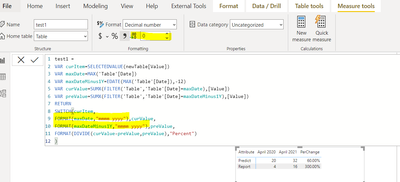
It seems to be working, but is there any way to format the column headers as April 2020 and April 2021 instead of m/d/yyyy?
Also how can I format the values to not be decimal and just whole numbers?
Thank you so much!! Do you mind explaining to me what you did so I can learn for my own self please?
Hi @natasha519
I was creating a custom column for the Columns in Matrix, the use SWITCH to do different calculation (or call different measures) as you wanted to calculate different values in the same matrix...
Join us in Barcelona for FabCon and SQLCon, the Fabric, Power BI, SQL, and AI community event. Save €200 with code FABCMTY200.
Join Fabric Data Days 2026: 60 days of free live/on-demand sessions, challenges, study groups, and certification opportunities.