Join us in Barcelona for FabCon and SQLCon, September 28 - October 1, 2026.
This is best Fabric, Power BI, SQL and AI community event. How do we know? The last event sold out! Save €200 with code FABCMTY200.
Register now- Power BI forums
- Get Help with Power BI
- Desktop
- Service
- Report Server
- Power Query
- Mobile Apps
- Developer
- DAX Commands and Tips
- Custom Visuals Development Discussion
- Health and Life Sciences
- Power BI Spanish forums
- Translated Spanish Desktop
- Training and Consulting
- Instructor Led Training
- Dashboard in a Day for Women, by Women
- Galleries
- Data Stories Gallery
- Themes Gallery
- Contests Gallery
- QuickViz Gallery
- Quick Measures Gallery
- Visual Calculations Gallery
- Fabric Apps Gallery
- Notebook Gallery
- Translytical Task Flow Gallery
- TMDL Gallery
- R Script Showcase
- Webinars and Video Gallery
- Ideas
- Custom Visuals Ideas (read-only)
- Issues
- Issues
- Events
- Upcoming Events
The Fabric community is now in read-only for platform upgrade. Learn more
- Power BI forums
- Forums
- Get Help with Power BI
- Power Query
- Re: Calculating Difference Between Two Dates using...
- Subscribe to RSS Feed
- Mark Topic as New
- Mark Topic as Read
- Float this Topic for Current User
- Bookmark
- Subscribe
- Printer Friendly Page

- Mark as New
- Bookmark
- Subscribe
- Mute
- Subscribe to RSS Feed
- Permalink
Calculating Difference Between Two Dates using Multiple If statements
I have another multiple "if statement" that I'm having issues with.
PKG.1_DATE1 =1/1/2020
PKG.1_DATE2 = 1/14/2020
PKG.2_DATE1 = 1/2/2020
PKG.2_DATE2 = 1/20/2020
This worked
Custom Column -> Latest Package Delay = if List.Max({[PKG.1_DATE2], [PKG.2_DATE2]}) = 0 then null else List.Max({[PKG.1_DATE2], [PKG.2_DATE2]})
This does not work
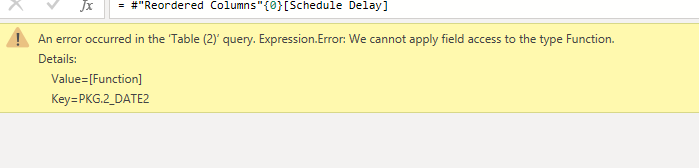
Custom Column -> Schedule Delay = if [Latest Package Date] = null then 0 else if [Latest Package Date] = [PKG.1_DATE2] then (Duration.Days [PKG.1_DATE2]-[PKG.1_DATE1])/7 else if [Latest Package Date] = [PKG.2_DATE2] then (Duration.Days [PKG.2_DATE2]-[PKG.2_DATE1])/7 else 0


- Mark as New
- Bookmark
- Subscribe
- Mute
- Subscribe to RSS Feed
- Permalink
Hi @Anonymous ,
Do you mean to calculate the difference with Duration.Days()? It should be "Duration.Days( [PKG.1_DATE2]-[PKG.1_DATE1] )/7"

If this post helps, then please consider Accept it as the solution to help the other members find it.
- Mark as New
- Bookmark
- Subscribe
- Mute
- Subscribe to RSS Feed
- Permalink
@v-eachen-msft See message 5. I'm already using the Duration Days in my power query. I need to calculate the Duration Days from the latest package date.


- Mark as New
- Bookmark
- Subscribe
- Mute
- Subscribe to RSS Feed
- Permalink
Is the second custom column referencing the first one? Maybe just a typo in the post, but the names are different (Latest Package Date vs. Latest Package Delay).
If this works for you, please mark it as the solution. Kudos are appreciated too. Please let me know if not.
Regards,
Pat
Did I answer your question? Mark my post as a solution! Kudos are also appreciated!
To learn more about Power BI, follow me on Twitter or subscribe on YouTube.
@mahoneypa HoosierBI on YouTube
- Mark as New
- Bookmark
- Subscribe
- Mute
- Subscribe to RSS Feed
- Permalink
No, it should be Latest Package Date. This is not a problem. I need to find the difference in weeks from the latest package date.
- Mark as New
- Bookmark
- Subscribe
- Mute
- Subscribe to RSS Feed
- Permalink
if this
Custom Column -> Latest Package Delay = if List.Max({[PKG.1_DATE2], [PKG.2_DATE2]}) = 0 then null else List.Max({[PKG.1_DATE2], [PKG.2_DATE2]})
works, I suspect the column type [PKG.....] is not date.
Then the error that probably raises the following expression.
Could you give some example of the input table and the expected ouput table?
- Mark as New
- Bookmark
- Subscribe
- Mute
- Subscribe to RSS Feed
- Permalink
@Anonymous Thanks again for your help.
The expected output table for column "Schedule Delay" should be a value for the number of weeks delayed.
Input Table

- Mark as New
- Bookmark
- Subscribe
- Mute
- Subscribe to RSS Feed
- Permalink
and the input table is ...
you should give only some fictitious examples of the data you manage.
Is important know the number, the order and the name on the columns involved; the tipical case you wanto to treat:
For example if you have the max you are looking for in two differente pkg, which pkg we should considere to calculate the delay.
etc etc..
- Mark as New
- Bookmark
- Subscribe
- Mute
- Subscribe to RSS Feed
- Permalink
@Anonymous
Input Table

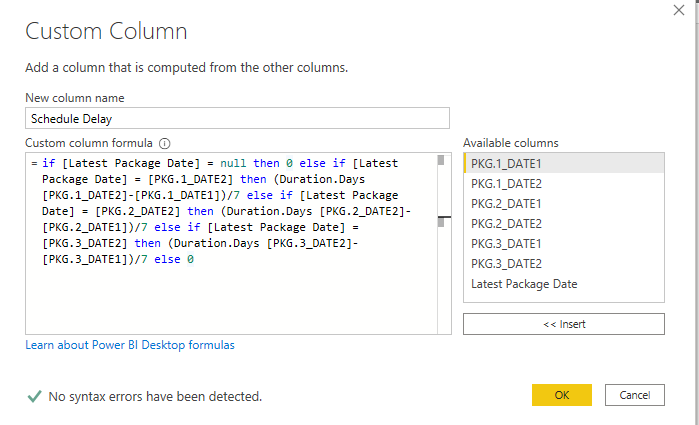

Date 2 for each package is a revised date. I want to pick the latest revised date and calculate the date difference (in weeks) between the revised date (date 2) and the initial planned date (date 1).
For example, in the input above the difference in PKG.1_Date2 and PKG.1_Date1 is 2. However, since PKG.2_Date2 is the furthest date out, I want to choose that as my baseline and calculate the date difference (in weeks) between the PKG.2_Date2 and PKG.2_Date1. Since there is nothing for PKG.3_Date1 and PKG.3_Date2 in this case, it will not impact the result. However, if there was a date for it, then it may impact the result.
Helpful resources

FabCon & SQLCon – Barcelona 2026
Join us in Barcelona for FabCon and SQLCon, the Fabric, Power BI, SQL, and AI community event. Save €200 with code FABCMTY200.

Power BI DataViz World Championships - June 2026
A new Power BI DataViz World Championship is coming this June! Don't miss out on submitting your entry.


