cancel
Showing results for 
Search instead for 
Did you mean: 

A new Data Days event is coming soon! This time we’re going bigger than ever. Fabric, Power BI, SQL, AI and more. Don't miss out.

Reply
pgeorgieff1
Regular Visitor

Calculated column with value from another table based on date range and another value

Hi, 


I have two tables in DirectQuery mode: Tasks and Work Hours. 

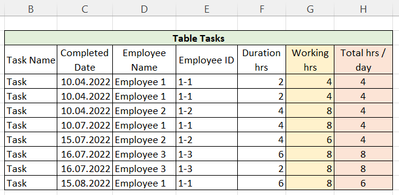
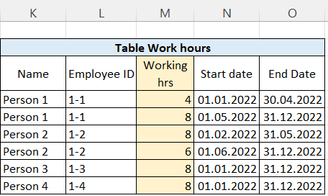
pgeorgieff1_2-1658309273334.png   pgeorgieff1_3-1658309287462.png

The table Tasks shows how much an employee spent on task on particular day.

Work Hours shows how much a person is available between two dates. 


I want to add a column Working hours from Table Work Hours to Table Tasks based on Employee ID and Completed Date. I also want to add another column Total hrs / day, which calculates how many hours an Employee spent in a day again based on Employee ID and Completed Date. 


In excel I achieved this by the following formulas:

For working hrs: =INDEX(M4:M9;MATCH(1;(E4=L4:L9)*(C4>=N4:N9)*(C4<=O4:O9);0))

For Total hrs / day: SUMIFS(F4:F11;C4:C11;C4;E4:E11;E4)


Can you please help me add those columns in the table Tasks?

1 ACCEPTED SOLUTION
BA_Pete
Super User
Super User

Hi @pgeorgieff1 ,


Try this as a calculated column on your Tasks table, but I'm not sure everything here is compatible with Direct Query, to be honest:

..workingHours =
CALCULATE(
	VAR __empIdRow = VALUES(TasksTable[Employee ID])
	VAR __compDateRow = VALUES(TasksTable[Completed Date])
	RETURN
	MAXX(
		FILTER(
			workHoursTable,
			workHoursTable[Employee ID] = __empIdRow
			&& workHoursTable[Start date] <= __compDateRow
			&& workHoursTable[End date] >= __compDateRow
		),
		workHoursTable[Working hrs]
	)
)


Pete


Now accepting Kudos! If my post helped you, why not give it a thumbs-up?

Proud to be a Datanaut!


View solution in original post

3 REPLIES 3
pgeorgieff1
Regular Visitor

Hi, Pete, 


Thanks for your help. It works only in import mode. Still it's very useful. 

BA_Pete
Super User
Super User

Hi @pgeorgieff1 ,


Try this as a calculated column on your Tasks table, but I'm not sure everything here is compatible with Direct Query, to be honest:

..workingHours =
CALCULATE(
	VAR __empIdRow = VALUES(TasksTable[Employee ID])
	VAR __compDateRow = VALUES(TasksTable[Completed Date])
	RETURN
	MAXX(
		FILTER(
			workHoursTable,
			workHoursTable[Employee ID] = __empIdRow
			&& workHoursTable[Start date] <= __compDateRow
			&& workHoursTable[End date] >= __compDateRow
		),
		workHoursTable[Working hrs]
	)
)


Pete


Now accepting Kudos! If my post helped you, why not give it a thumbs-up?

Proud to be a Datanaut!


Hi Pete, 


Thanks your reply. 

I did lots of transformation which delayed me with the reply. 

There are no error in the rows, but all of them are blank. Have you got an idea what the reason can be? 

Regards,

Philip

Helpful resources

Announcements
May Power BI Update Carousel

Power BI Monthly Update - May 2026

Check out the May 2026 Power BI update to learn about new features.

Fabric SQL PBI Data Days

Data Days 2026 coming soon!

Sign up to receive a private message when registration opens and key events begin.

New to Fabric survey Carousel

New to Fabric Survey

If you have recently started exploring Fabric, we'd love to hear how it's going. Your feedback can help with product improvements.

Power BI DataViz World Championships carousel

Power BI DataViz World Championships - June 2026

A new Power BI DataViz World Championship is coming this June! Don't miss out on submitting your entry.