cancel
Showing results for 
Search instead for 
Did you mean: 

July 7 - July 17 | Round 2 of the Power BI Dataviz World Championships. Don't miss your chance! Learn more

Reply
Anonymous
Not applicable

Calculated Table

Hello Trying to get a top n and others calculation going on for some visuals I created a calculated table to get distinct names from a client table using this 

Customers Plus Others =
Union(
VALUES(ClientType[Client]), --get table of all customer names
Row( "Customers", "Others") --get table of Others
)
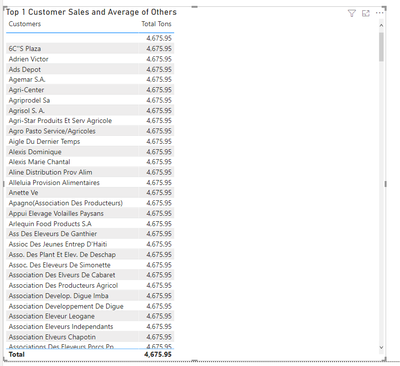
Table shows up correctly on visual no problem , now when I try to add my total tonnage measure, the same amount gets repeated
this is the measure for total tonnage: 
Total Tons = SUM('Sales Values'[Tonnage])
cmgp01_0-1631910375246.png

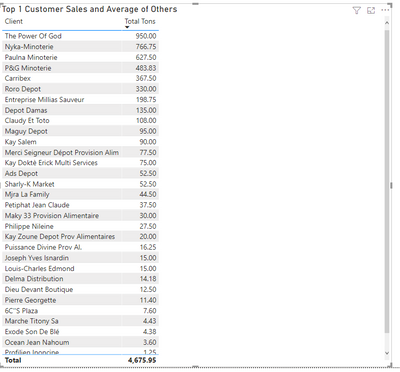
How can i fix this? the client type table has a relationship with the sales values table if I use the customer names from the client Type table I have no problems the only thing I don't have a "Others"row

cmgp01_1-1631910570454.png


1 ACCEPTED SOLUTION
Anonymous
Not applicable

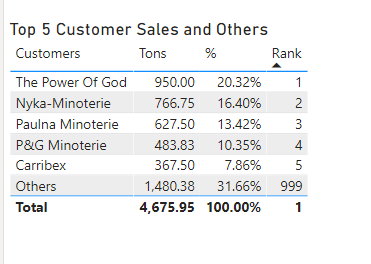
This woks but not what I was looking for since I am crating a top n with an "Others" row. I found the solution by creating another measure: 

Total Tons 2 = CALCULATE ( SUM ( 'Sales Values'[Tonnage] ), TREATAS ( VALUES ( 'Customers Plus Others'[Customers]), ClientType[Client] ) )
 
and this gives me the result I was looking for cmgp01_0-1632224834116.png


Thanks for your help!!

View solution in original post

6 REPLIES 6
v-yingjl
Community Support
Community Support

Hi @Anonymous ,

If not want to use the relationship in the previous table, you can create the calculated table like this:

Customers Plus Others = UNION('ClientType','Customers')

Create the total measure:

Total =
CALCULATE (
    SUM ( 'Sales Values'[Tonnage] ),
    FILTER (
        'Sales Values',
        'Sales Values'[ID] IN DISTINCT ( 'Customers Plus Others'[ID] )
    )
)

vyingjl_0-1632187803424.png


Best Regards,
Community Support Team _ Yingjie Li
If this post helps, then please consider Accept it as the solution to help the other members find it more quickly.

This woks but not what I was looking for since I am crating a top n with an "Others" row. I found the solution by creating another measure: 

Total Tons 2 = CALCULATE ( SUM ( 'Sales Values'[Tonnage] ), TREATAS ( VALUES ( 'Customers Plus Others'[Customers]), ClientType[Client] ) )
 
and this gives me the result I was looking for cmgp01_0-1632224834116.png


Thanks for your help!!

Anonymous
Not applicable

This woks but not what I was looking for since I am crating a top n with an "Others" row. I found the solution by creating another measure: 

Total Tons 2 = CALCULATE ( SUM ( 'Sales Values'[Tonnage] ), TREATAS ( VALUES ( 'Customers Plus Others'[Customers]), ClientType[Client] ) )
 
and this gives me the result I was looking for cmgp01_0-1632224834116.png


Thanks for your help!!

Syndicate_Admin
Administrator
Administrator

@cmgp01 See if this works.


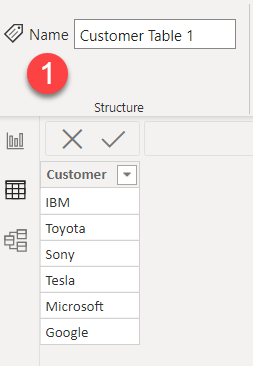
Table # 1


ponnusamy_1-1631972435314.png


Table # 2

ponnusamy_2-1631972447372.png


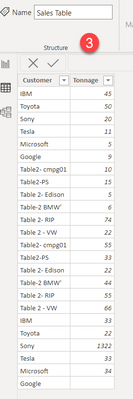
Table # 3 (Sale Fact)

ponnusamy_3-1631972473366.png


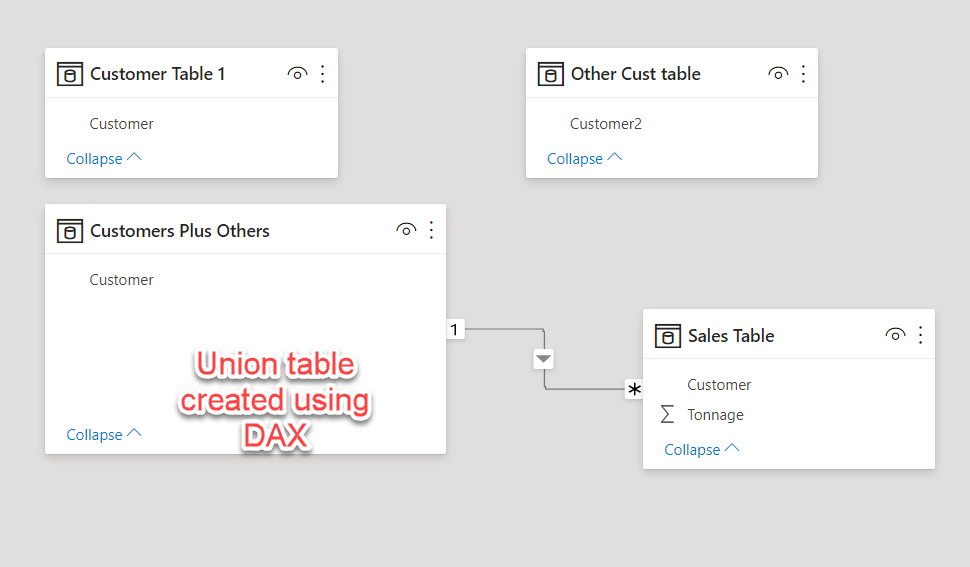
Union Table (DAX)


ponnusamy_4-1631972510273.png


ponnusamy_5-1631972542763.png


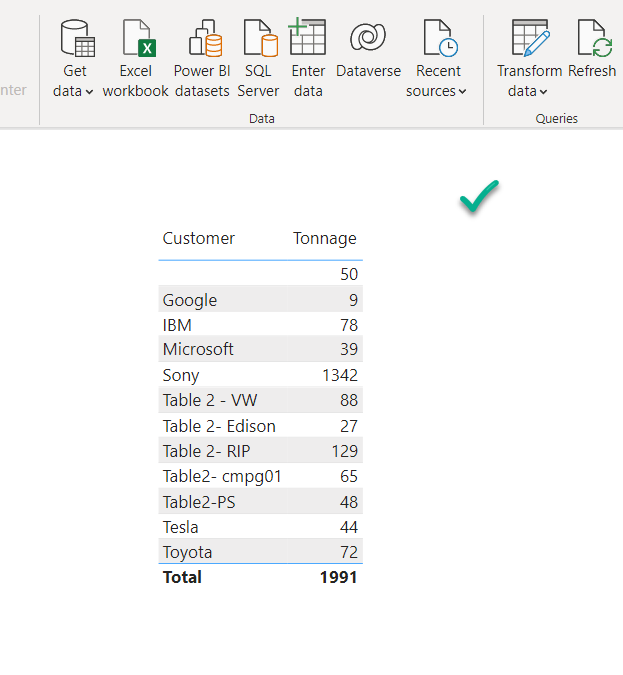
Result


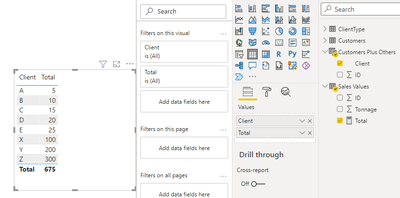
ponnusamy_6-1631972585250.png


Syndicate_Admin
Administrator
Administrator

@cmgp01 See if this works.


Table # 1


ponnusamy_1-1631972435314.png


Table # 2

ponnusamy_2-1631972447372.png


Table # 3 (Sale Fact)

ponnusamy_3-1631972473366.png


Union Table (DAX)


ponnusamy_4-1631972510273.png


ponnusamy_5-1631972542763.png


Result


ponnusamy_6-1631972585250.png


ponnusamy
Solution Supplier
Solution Supplier

@Anonymous See if this works.


Table # 1


ponnusamy_1-1631972435314.png


Table # 2

ponnusamy_2-1631972447372.png


Table # 3 (Sale Fact)

ponnusamy_3-1631972473366.png


Union Table (DAX)


ponnusamy_4-1631972510273.png


ponnusamy_5-1631972542763.png


Result


ponnusamy_6-1631972585250.png


If this post helps, then please consider Accepting it as the solution, Give Kudos to motivate the contributors.


Helpful resources

Announcements
FabCon and SQLCon Barcelona 2026

FabCon & SQLCon – Barcelona 2026

Join us in Barcelona for FabCon and SQLCon, the Fabric, Power BI, SQL, and AI community event. Save €200 with code FABCMTY200.

60 days of Data Days Carousel

Data Days 2026

Join Fabric Data Days 2026: 60 days of free live/on-demand sessions, challenges, study groups, and certification opportunities.

Power BI DataViz World Championships carousel

Power BI DataViz World Championships - June 2026

A new Power BI DataViz World Championship is coming this June! Don't miss out on submitting your entry.