Join us in Barcelona for FabCon and SQLCon, September 28 - October 1, 2026.
This is best Fabric, Power BI, SQL and AI community event. How do we know? The last event sold out! Save €200 with code FABCMTY200.
Register now- Power BI forums
- Get Help with Power BI
- Desktop
- Service
- Report Server
- Power Query
- Mobile Apps
- Developer
- DAX Commands and Tips
- Custom Visuals Development Discussion
- Health and Life Sciences
- Power BI Spanish forums
- Translated Spanish Desktop
- Training and Consulting
- Instructor Led Training
- Dashboard in a Day for Women, by Women
- Galleries
- Data Stories Gallery
- Themes Gallery
- Contests Gallery
- QuickViz Gallery
- Quick Measures Gallery
- Visual Calculations Gallery
- Fabric Apps Gallery
- Notebook Gallery
- Translytical Task Flow Gallery
- TMDL Gallery
- R Script Showcase
- Webinars and Video Gallery
- Ideas
- Custom Visuals Ideas (read-only)
- Issues
- Issues
- Events
- Upcoming Events
The Fabric community is now in read-only for platform upgrade. Learn more
- Power BI forums
- Forums
- Get Help with Power BI
- Power Query
- Calculated Table
- Subscribe to RSS Feed
- Mark Topic as New
- Mark Topic as Read
- Float this Topic for Current User
- Bookmark
- Subscribe
- Printer Friendly Page

- Mark as New
- Bookmark
- Subscribe
- Mute
- Subscribe to RSS Feed
- Permalink
Calculated Table
Hello Trying to get a top n and others calculation going on for some visuals I created a calculated table to get distinct names from a client table using this
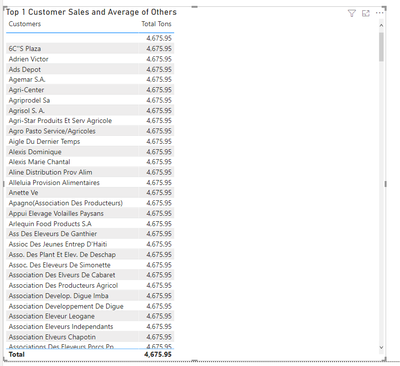
How can i fix this? the client type table has a relationship with the sales values table if I use the customer names from the client Type table I have no problems the only thing I don't have a "Others"row
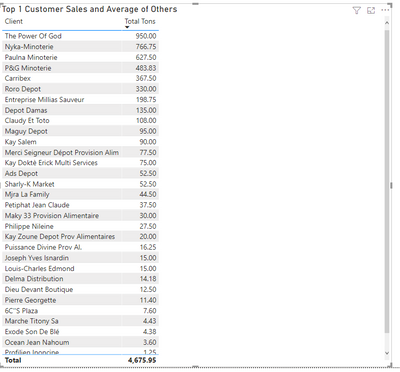
Solved! Go to Solution.
- Mark as New
- Bookmark
- Subscribe
- Mute
- Subscribe to RSS Feed
- Permalink
This woks but not what I was looking for since I am crating a top n with an "Others" row. I found the solution by creating another measure:
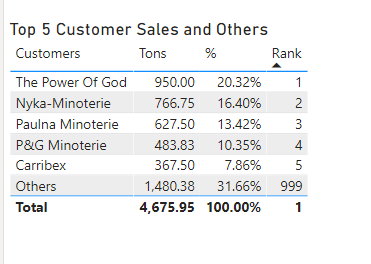
Thanks for your help!!


- Mark as New
- Bookmark
- Subscribe
- Mute
- Subscribe to RSS Feed
- Permalink
Hi @Anonymous ,
If not want to use the relationship in the previous table, you can create the calculated table like this:
Customers Plus Others = UNION('ClientType','Customers')Create the total measure:
Total =
CALCULATE (
    SUM ( 'Sales Values'[Tonnage] ),
    FILTER (
        'Sales Values',
        'Sales Values'[ID] IN DISTINCT ( 'Customers Plus Others'[ID] )
    )
)
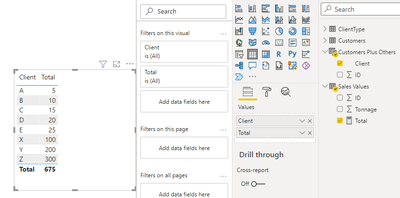
Best Regards,
Community Support Team _ Yingjie Li
If this post helps, then please consider Accept it as the solution to help the other members find it more quickly.


- Mark as New
- Bookmark
- Subscribe
- Mute
- Subscribe to RSS Feed
- Permalink
This woks but not what I was looking for since I am crating a top n with an "Others" row. I found the solution by creating another measure:
Thanks for your help!!
- Mark as New
- Bookmark
- Subscribe
- Mute
- Subscribe to RSS Feed
- Permalink
This woks but not what I was looking for since I am crating a top n with an "Others" row. I found the solution by creating another measure:
Thanks for your help!!


- Mark as New
- Bookmark
- Subscribe
- Mute
- Subscribe to RSS Feed
- Permalink
@Anonymous See if this works.
Table # 1
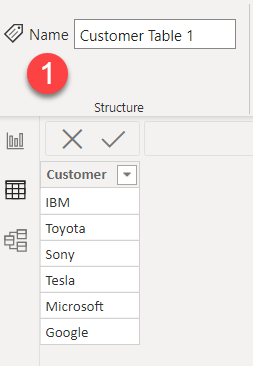
Table # 2

Table # 3 (Sale Fact)
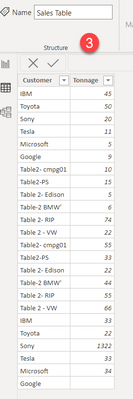
Union Table (DAX)

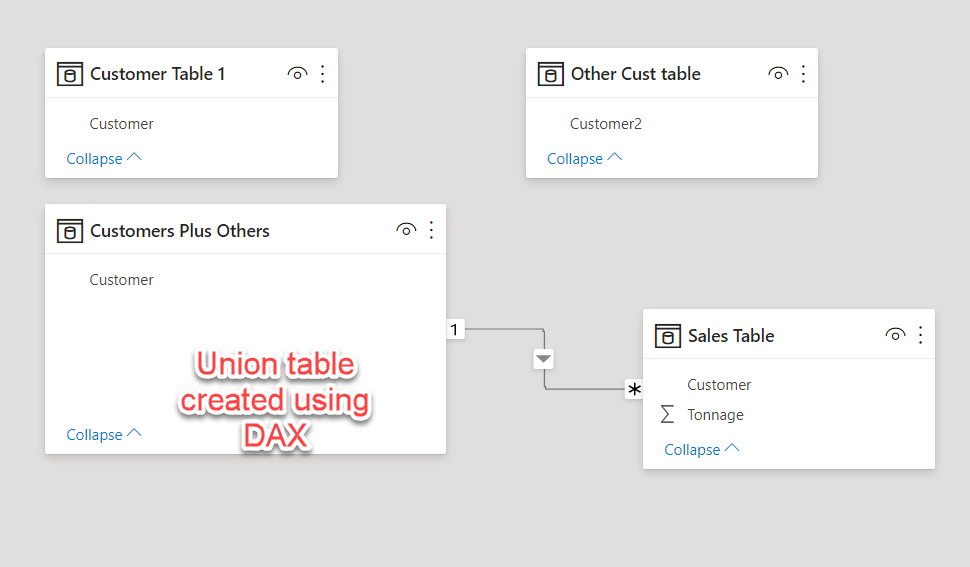
Result
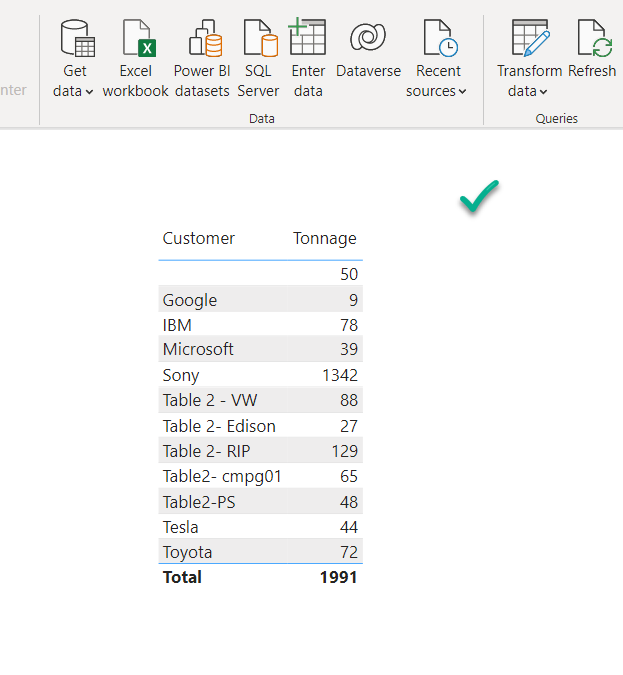
If this post helps, then please consider Accepting it as the solution, Give Kudos to motivate the contributors.
Helpful resources

FabCon & SQLCon – Barcelona 2026
Join us in Barcelona for FabCon and SQLCon, the Fabric, Power BI, SQL, and AI community event. Save €200 with code FABCMTY200.

Power BI DataViz World Championships - June 2026
A new Power BI DataViz World Championship is coming this June! Don't miss out on submitting your entry.


