This time we’re going bigger than ever. Fabric, Power BI, SQL, AI and more. We're covering it all. You won't want to miss it.
Learn moreDid you hear? There's a new SQL AI Developer certification (DP-800). Start preparing now and be one of the first to get certified. Register now
Hello,
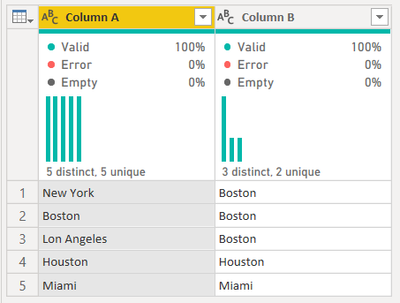
I'm trying to replace multiple text values in one power query step. In the example below, New York and Los Angeles should be changed to Boston.
Any help appreciated.
Thanks!
Solved! Go to Solution.
In a Custom column put following
= if List.Contains({"New York","Los Angeles"},[Column A]) then "Boston" else [Column A]See the working here - Open a blank query - Home - Advanced Editor - Remove everything from there and paste the below code to test
let
Source = Table.FromRows(Json.Document(Binary.Decompress(Binary.FromText("i45W8kstV4jML8pWitWJVnLKLy7JzwMzffKLFRzz0lNzUovBfI/8Uricb2ZibqZSbCwA", BinaryEncoding.Base64), Compression.Deflate)), let _t = ((type nullable text) meta [Serialized.Text = true]) in type table [#"Column A" = _t]),
#"Added Custom" = Table.AddColumn(Source, "Column B", each if List.Contains({"New York","Los Angeles"},[Column A]) then "Boston" else [Column A])
in
#"Added Custom"
For same column, insert this step where Source should be replaced with your previous step
= Table.ReplaceValue(Source,each [Column A],each if List.Contains({"New York","Los Angeles"},[Column A]) then "Boston" else [Column A],Replacer.ReplaceValue,{"Column A"})
For same column, insert this step where Source should be replaced with your previous step
= Table.ReplaceValue(Source,each [Column A],each if List.Contains({"New York","Los Angeles"},[Column A]) then "Boston" else [Column A],Replacer.ReplaceValue,{"Column A"})
In a Custom column put following
= if List.Contains({"New York","Los Angeles"},[Column A]) then "Boston" else [Column A]See the working here - Open a blank query - Home - Advanced Editor - Remove everything from there and paste the below code to test
let
Source = Table.FromRows(Json.Document(Binary.Decompress(Binary.FromText("i45W8kstV4jML8pWitWJVnLKLy7JzwMzffKLFRzz0lNzUovBfI/8Uricb2ZibqZSbCwA", BinaryEncoding.Base64), Compression.Deflate)), let _t = ((type nullable text) meta [Serialized.Text = true]) in type table [#"Column A" = _t]),
#"Added Custom" = Table.AddColumn(Source, "Column B", each if List.Contains({"New York","Los Angeles"},[Column A]) then "Boston" else [Column A])
in
#"Added Custom"
Check out the April 2026 Power BI update to learn about new features.
Sign up to receive a private message when registration opens and key events begin.
If you have recently started exploring Fabric, we'd love to hear how it's going. Your feedback can help with product improvements.
| User | Count |
|---|---|
| 7 | |
| 5 | |
| 4 | |
| 3 | |
| 3 |