Join us at FabCon Atlanta from March 16 - 20, 2026, for the ultimate Fabric, Power BI, AI and SQL community-led event. Save $200 with code FABCOMM.
Register now!Get Fabric Certified for FREE during Fabric Data Days. Don't miss your chance! Request now
Hello,
Needed some help for the following :
I am trying to import a Sharepoint List into Power BI desktop. All columns are getting loaded except Bamboo Rating column (5 star review) . However I am able to see the count assocsiated with the column (for eg : how many people have rated )
Hi @Anonymous ,
If I understand your scenario better, you could import all of the column in SharePoint online list except for one column?
If it is, what is the Bamboo Rating column?
Could you see the Bamboo Rating column in SharePoint online list?
If it is convenient, please share some screenshots to describe your scenario better.
In addition, please check if you have installed the latest version of Power BI Desktop.
Best Regards,
Cherry
Hi Cherry,
Thanks.
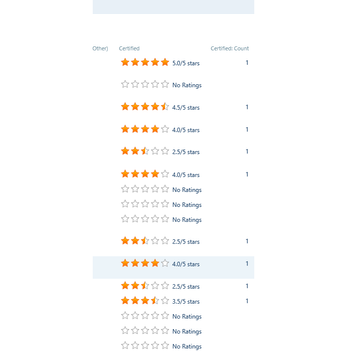
Below is the column for eg: column name is "Certified". by default a "Certified Count" is generated in Sharepoint.
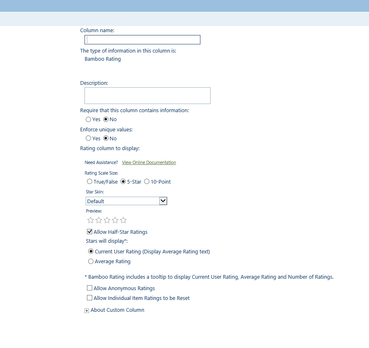
When trying to import in Power BI desktop just the "Certified Count" is imported. I have created the Bamboo rating column as below in Sharepoint List.
Hi @Anonymous ,
By my tests with the latest version of Power BI Desktop, I'm afraid that we cannot import the column rating from SharePoint Online List in Power BI Desktop, it will only import the rating count.
You could sumbit this idea in Power BI ideas Forum and add your comments.
Best Regards,
Cherry
Check out the November 2025 Power BI update to learn about new features.
Advance your Data & AI career with 50 days of live learning, contests, hands-on challenges, study groups & certifications and more!
| User | Count |
|---|---|
| 10 | |
| 9 | |
| 6 | |
| 5 | |
| 3 |