Share feedback directly with Fabric product managers, participate in targeted research studies and influence the Fabric roadmap.
Sign up nowGet Fabric certified for FREE! Don't miss your chance! Learn more
Hi,
I have been through the other forum posts to find a solution to my issue, however, none of them has worked!
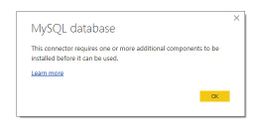
When I try to "Get Data > MySQL > connect", I receive :The Error Pop-up
I tried all the solutions I could find in the forum (installing the 64-Bit ODBC connector, as well as the Connector/Net one), and have restarted to see if there were any registry updates or other restart required issues.
> Computer: Windows 7 (SP1), 64-Bit
> MySQL - database and server all on the same PC, same harddrive etc.
I can't seem to get it to connect at all!
Any other suggestions: I would be very willing to try!
Kind regards
Neil
@sotnar1 ,
Do you install 32 bit or 64 bit Power BI Desktop? Before you can connect to a MySQL database, please install latest version of MySQL Connector/Net for Microsoft Windows on your computer, select the driver that matches your Power BI Desktop installation (32-bit or 64-bit).
If the connection still fails in Power BI Desktop, please check that if you are able to connect to the MySQL database in MySQL workbench, ensure that MySQL workbench is installed in the same machine as Power BI Desktop.
Regards,
Lydia
If you love stickers, then you will definitely want to check out our Community Sticker Challenge!
Check out the January 2026 Power BI update to learn about new features.
| User | Count |
|---|---|
| 13 | |
| 11 | |
| 11 | |
| 8 | |
| 6 |