cancel
Showing results for 
Search instead for 
Did you mean: 

July 7 - July 17 | Round 2 of the Power BI Dataviz World Championships. Don't miss your chance! Learn more

Reply
Marcin
Helper V
Helper V

Azure SSAS tabular refresh issue

Hi,


Need help, I try to schedule refresh to my data set made by Import method from SSAS Tabular on Azure service. 


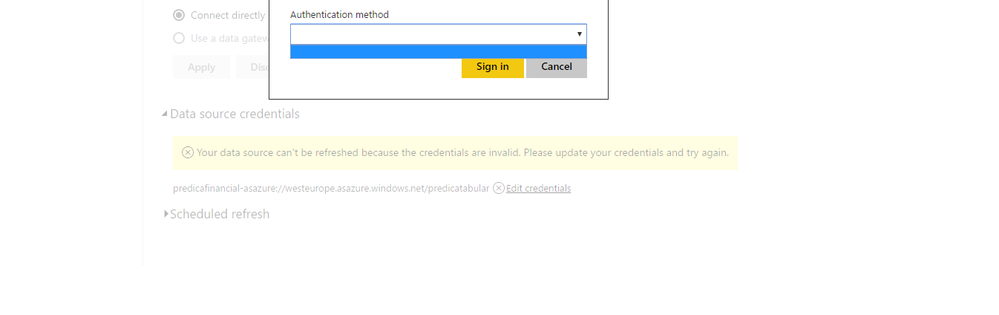
First I had error : Your data source can't be refreshed because the credentials are invalid. Please update your credentials and try again.


Then I try to use Edit Credentials option , Authentication method : Basic. After that I got another issue:


Failed to update data source credentials: We're sorry, an error occurred during evaluation.

Activity ID:14aae75d-705b-d7de-0b17-f3933949ce69
Request ID:87fdaeff-1d97-2023-8501-88e14a49dda9
Status code:400


Thank's for help !

6 REPLIES 6
Anonymous
Not applicable

Hi @Marcin

I test the scenario as yours, when I publish Power BI Desktop file to Power BI Service, I  get the same error as yours. However, there is no Authentication method for me to choose, please check my screenshot.
1.PNG


But if I choose “Connect Live” to connect to Azure Analysis Service in Power BI Desktop, I can refresh the dataset in Power BI Service. Could you please check that if you are able to refresh dataset when using “Connect Live” mode  to connect to your Azure AS source?


Thanks,
Lydia Zhang

When I connect to data model in Direct Query mode there is no need to refresh data, they are up to date all the time becouse of Live Connection. I need that report with Imported data to my Power BI model. 

Anonymous
Not applicable

Hi @Marcin,

Please run fiddler trace and show us trace information.

Thanks,
Lydia Zhang

This time I have the same problem , I can't choose Authentication method:


issue.png

Anonymous
Not applicable

Hi @Marcin,

I get information from PG that the feature( refresh model on Power BI Service with Azure AS data source in import mode) is not supported. This limitation will be documented in official article.

In your scenario, you would need to choose “Connect Live” to connect to Azure Analysis Service in Power BI Desktop and will be able to refresh the dataset in Power BI Service.

Thanks,
Lydia Zhang

Anonymous
Not applicable

Hi @Marcin,

I will report this issue internally and post back once I get any updates.

Thanks,
Lydia Zhang

Helpful resources

Announcements
FabCon and SQLCon Barcelona 2026

FabCon & SQLCon – Barcelona 2026

Join us in Barcelona for FabCon and SQLCon, the Fabric, Power BI, SQL, and AI community event. Save €200 with code FABCMTY200.

60 days of Data Days Carousel

Data Days 2026

Join Fabric Data Days 2026: 60 days of free live/on-demand sessions, challenges, study groups, and certification opportunities.

Power BI DataViz World Championships carousel

Power BI DataViz World Championships - June 2026

A new Power BI DataViz World Championship is coming this June! Don't miss out on submitting your entry.