Learn from the best! Meet the four finalists headed to the FINALS of the Power BI Dataviz World Championships! Register now
Dear all,
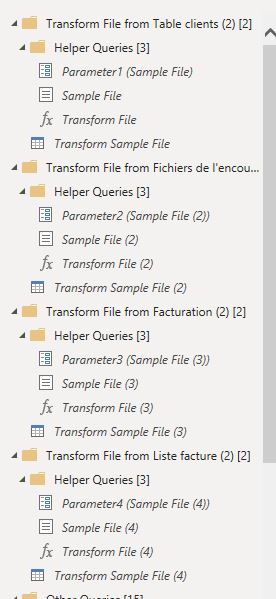
I did the following steps for 4 differents folder:
1- Get data
2- Folder
3- Combine data
Can I avoid to have several Helper Queries into Power Query Editor ?
Thank you in advance.
Solved! Go to Solution.
Hi @julrua
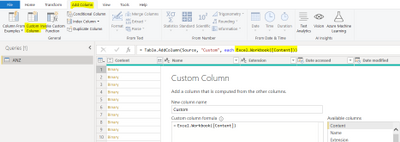
You are reading from folders, right? Add a custom column, then use Excel.Workbook or Csv.Document (or anything else, depending on your files in the folder) to avoid help queries, combine the tables in the custom column
Hi @Anonymous
I have the same problem, however adding the custom column didn't solve the problem.
I leave the folder that I am trying to carry out the queries: https://drive.google.com/drive/u/0/folders/10RNAAKY2IQJbcHzocw58rBHOtNFyqLij
Example of what the reading looks like after adding the custom column:
thank you very much for your attention 🙂
Not without 100% manually doing the combine operation yourself with manual code.
Those were introduced about 3 years ago to make the combining of files more robust and flexible. There is a full overview here.
DAX is for Analysis. Power Query is for Data Modeling
Proud to be a Super User!
MCSA: BI ReportingHi @julrua
You are reading from folders, right? Add a custom column, then use Excel.Workbook or Csv.Document (or anything else, depending on your files in the folder) to avoid help queries, combine the tables in the custom column
Hi @Anonymous I had the same problem with @julrua and did your recommended action to no avail. The custom column was showing an error. Is there any other way to solve this? Thanks 🙂
what kind of error you came across? what type of files in the folder you wanted to combine? with the same header?
| User | Count |
|---|---|
| 11 | |
| 8 | |
| 7 | |
| 5 | |
| 5 |