Join us at FabCon Atlanta from March 16 - 20, 2026, for the ultimate Fabric, Power BI, AI and SQL community-led event. Save $200 with code FABCOMM.
Register now!The Power BI Data Visualization World Championships is back! It's time to submit your entry. Live now!
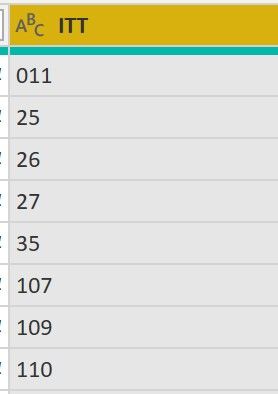
hello i am inporting data from a excel spreadsheet, but for some reason it is removing leading 0's
e.g in the excel file 25 is 025. how can i stop power query removing the 0. for some reason it did not remove the 0 from 011!
Solved! Go to Solution.
Hi @NewbieJono ,
It seems like ITT Column was taken as Number datatype by Power Query, hence 0 were removed from beginning.
When converted to text, the 0s were ignored.
You need to remove the part from M Query where ITT is converted to number datatype.
Weird behaviour with "011" though.
Can you paste the M Query Code here so that we can look into it?
Give a Thumbs Up if this post helped you in any way and Mark This Post as Solution if it solved your query !!! Proud To Be a Super User !!! |
In the Query Options, uncheck "Automatically detect data types..."
--Nate
Hi @NewbieJono ,
It seems like ITT Column was taken as Number datatype by Power Query, hence 0 were removed from beginning.
When converted to text, the 0s were ignored.
You need to remove the part from M Query where ITT is converted to number datatype.
Weird behaviour with "011" though.
Can you paste the M Query Code here so that we can look into it?
Give a Thumbs Up if this post helped you in any way and Mark This Post as Solution if it solved your query !!! Proud To Be a Super User !!! |
The Power BI Data Visualization World Championships is back! It's time to submit your entry.
| User | Count |
|---|---|
| 18 | |
| 9 | |
| 8 | |
| 8 | |
| 7 |