cancel
Showing results for 
Search instead for 
Did you mean: 

July 7 - July 17 | Round 2 of the Power BI Dataviz World Championships. Don't miss your chance! Learn more

Reply
Markzolotoy
Impactful Individual

An json example

How to make this jason work in powe bi?

{"root":[{"catchCount":127,"DisplayName":"Forward to Diagnostics Team","SeriesName":"Alarm Category"},{"catchCount":2684,"DisplayName":"Retrain Model","SeriesName":"Alarm Category"},{"catchCount":15,"DisplayName":"True Alarm","SeriesName":"Alarm Category"},{"catchCount":213,"DisplayName":"Contact Plant","SeriesName":"Alarm Classification"},{"catchCount":9,"DisplayName":"Contact Support","SeriesName":"Alarm Classification"},{"catchCount":2599,"DisplayName":"Monitor","SeriesName":"Alarm Classification"},{"catchCount":4,"DisplayName":"Schedule Maintenance","SeriesName":"Alarm Classification"},{"catchCount":204,"DisplayName":"Electrical Problem","SeriesName":"Alarm Clear"},{"catchCount":9,"DisplayName":"Historian Offline","SeriesName":"Alarm Clear"},{"catchCount":2608,"DisplayName":"Mechanical Problem","SeriesName":"Alarm Clear"},{"catchCount":2,"DisplayName":"Network Problem","SeriesName":"Alarm Clear"},{"catchCount":9,"DisplayName":"Stuck Valve","SeriesName":"Alarm Clear"}]}


thanks

1 ACCEPTED SOLUTION

Here's a video stepping through the sample. The most important two parts are:

1) once you get to the step that shows "Record" for every list item, convert it to a table

2) expand using the double arrows at the top of Column


https://www.youtube.com/watch?v=t2b-aJ1spAU

View solution in original post

5 REPLIES 5
Bisyri_Mustofa
New Member

Thank you

Anonymous
Not applicable

Hi @Markzolotoy,

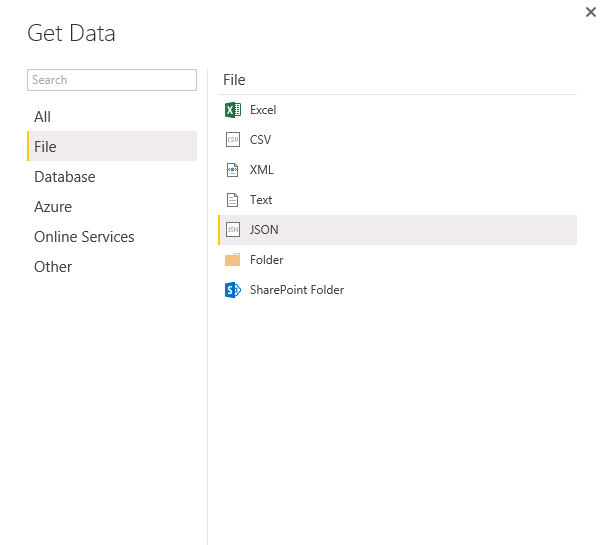
Have you tried to connect to the JSON file via Get Data>File>JSON in Power BI Desktop?
1.PNG
 

Also you can use Get Data > Web and enter the URL (or local path) to the JSON file to connect it. For more details, please review the following blog and similar thread.

https://eriksvensen.wordpress.com/2014/09/15/specifying-json-query-in-power-query-example-statistics...
http://superuser.com/questions/977249/loading-a-json-file-into-power-query/977376#977376

Thanks,
Lydia Zhang

I know how to point PBI to json. I am asking what kind of tweaks are required to get shown example to be interpreted properly.

Here's a video stepping through the sample. The most important two parts are:

1) once you get to the step that shows "Record" for every list item, convert it to a table

2) expand using the double arrows at the top of Column


https://www.youtube.com/watch?v=t2b-aJ1spAU

Yes, very helpful. I got it working when I use a local json file. But if I am trying to get data from a webservice I am not getting into the same steps. Specifically I dont have a screen with List to click on. can you please help


Thanks

Helpful resources

Announcements
FabCon and SQLCon Barcelona 2026

FabCon & SQLCon – Barcelona 2026

Join us in Barcelona for FabCon and SQLCon, the Fabric, Power BI, SQL, and AI community event. Save €200 with code FABCMTY200.

60 days of Data Days Carousel

Data Days 2026

Join Data Days 2026: 60 days of free live/on-demand sessions, challenges, study groups, and certification opportunities.

Power BI DataViz World Championships carousel

Power BI DataViz World Championships - June 2026

A new Power BI DataViz World Championship is coming this June! Don't miss out on submitting your entry.

Top Solution Authors