Get certified for free when you join Fabric Data Days 2026 and dive into Fabric, Power BI, SQL, AI, and other essential data skills.
Join nowTry your skills in the Power BI Dataviz World Championship! Round one ends June 26. Join now
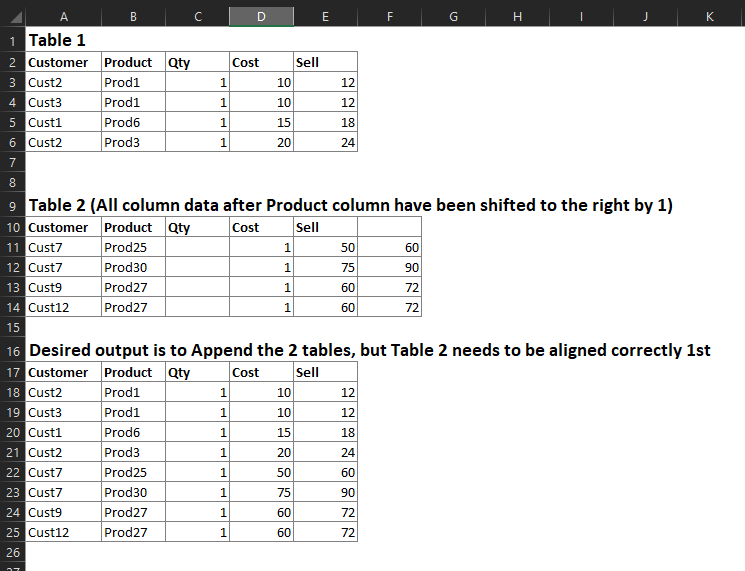
I have 2 different Excel tables I'm connecting to in Power Query and have noticed that some of the Column Headers do not match the Column Data. I need to append these 2 tables together, but the Headers need to be identical. I'm looking for a way to shift the column headers or column data in Table 2 so that they align. I listed an example below. My actual data has close to 100 columns so simply renaming the columns & deleteing the empty one will not work.
Solved! Go to Solution.
Hi @Anonymous,
I have a solution for you. It searches for all columns which are empty and removes them. Then shift the names of columns.
I've developed it as a function which will be easier to integrate in your solution.
let
Source = Table.FromRows(Json.Document(Binary.Decompress(Binary.FromText("i45WSlTSUUoCYiBKBuIUIE5VitWJVjIEsowgEsZAbALEpkqxsQA=", BinaryEncoding.Base64), Compression.Deflate)), let _t = ((type text) meta [Serialized.Text = true]) in type table [Customer = _t, Product = _t, Qty = _t, Cost = _t, Sell = _t, #" " = _t]),
fnShiftByOneEmptyColumn = (tbl as table) as table =>
let
// get column names of the origin table
ColumnNames = Table.ColumnNames(tbl),
// find columns which don't contain any values
EmptyColumns = List.Select(
ColumnNames,
each List.MatchesAll(Table.Column(tbl, _), each _ = null or _ = "")
),
// remove empty column from the origin table
RemoveEmptyColumn = Table.RemoveColumns(tbl, EmptyColumns),
// rename columns
RenameColumns = Table.RenameColumns(
RemoveEmptyColumn,
List.Zip(
{
// columns of the origin table without empty columns
Table.ColumnNames(RemoveEmptyColumn),
// N-x columns of the origin table
List.RemoveLastN(ColumnNames, List.Count(EmptyColumns))
}
)
)
in
RenameColumns,
Result = fnShiftByOneEmptyColumn(Source)
in
Result
Hi @Anonymous,
I have a solution for you. It searches for all columns which are empty and removes them. Then shift the names of columns.
I've developed it as a function which will be easier to integrate in your solution.
let
Source = Table.FromRows(Json.Document(Binary.Decompress(Binary.FromText("i45WSlTSUUoCYiBKBuIUIE5VitWJVjIEsowgEsZAbALEpkqxsQA=", BinaryEncoding.Base64), Compression.Deflate)), let _t = ((type text) meta [Serialized.Text = true]) in type table [Customer = _t, Product = _t, Qty = _t, Cost = _t, Sell = _t, #" " = _t]),
fnShiftByOneEmptyColumn = (tbl as table) as table =>
let
// get column names of the origin table
ColumnNames = Table.ColumnNames(tbl),
// find columns which don't contain any values
EmptyColumns = List.Select(
ColumnNames,
each List.MatchesAll(Table.Column(tbl, _), each _ = null or _ = "")
),
// remove empty column from the origin table
RemoveEmptyColumn = Table.RemoveColumns(tbl, EmptyColumns),
// rename columns
RenameColumns = Table.RenameColumns(
RemoveEmptyColumn,
List.Zip(
{
// columns of the origin table without empty columns
Table.ColumnNames(RemoveEmptyColumn),
// N-x columns of the origin table
List.RemoveLastN(ColumnNames, List.Count(EmptyColumns))
}
)
)
in
RenameColumns,
Result = fnShiftByOneEmptyColumn(Source)
in
Result
| User | Count |
|---|---|
| 4 | |
| 3 | |
| 2 | |
| 2 | |
| 1 |
| User | Count |
|---|---|
| 11 | |
| 9 | |
| 5 | |
| 4 | |
| 4 |