Share feedback directly with Fabric product managers, participate in targeted research studies and influence the Fabric roadmap.
Sign up nowGet Fabric certified for FREE! Don't miss your chance! Learn more
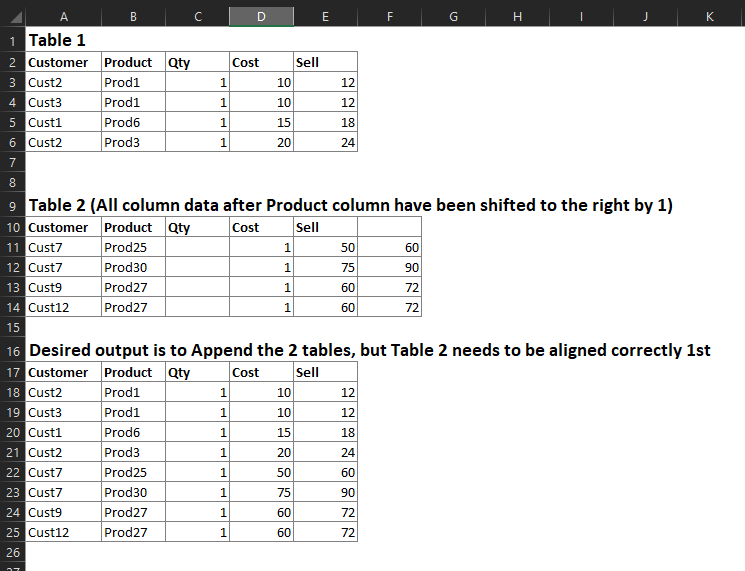
I have 2 different Excel tables I'm connecting to in Power Query and have noticed that some of the Column Headers do not match the Column Data. I need to append these 2 tables together, but the Headers need to be identical. I'm looking for a way to shift the column headers or column data in Table 2 so that they align. I listed an example below. My actual data has close to 100 columns so simply renaming the columns & deleteing the empty one will not work.
Solved! Go to Solution.
Hi @Anonymous,
I have a solution for you. It searches for all columns which are empty and removes them. Then shift the names of columns.
I've developed it as a function which will be easier to integrate in your solution.
let
Source = Table.FromRows(Json.Document(Binary.Decompress(Binary.FromText("i45WSlTSUUoCYiBKBuIUIE5VitWJVjIEsowgEsZAbALEpkqxsQA=", BinaryEncoding.Base64), Compression.Deflate)), let _t = ((type text) meta [Serialized.Text = true]) in type table [Customer = _t, Product = _t, Qty = _t, Cost = _t, Sell = _t, #" " = _t]),
fnShiftByOneEmptyColumn = (tbl as table) as table =>
let
// get column names of the origin table
ColumnNames = Table.ColumnNames(tbl),
// find columns which don't contain any values
EmptyColumns = List.Select(
ColumnNames,
each List.MatchesAll(Table.Column(tbl, _), each _ = null or _ = "")
),
// remove empty column from the origin table
RemoveEmptyColumn = Table.RemoveColumns(tbl, EmptyColumns),
// rename columns
RenameColumns = Table.RenameColumns(
RemoveEmptyColumn,
List.Zip(
{
// columns of the origin table without empty columns
Table.ColumnNames(RemoveEmptyColumn),
// N-x columns of the origin table
List.RemoveLastN(ColumnNames, List.Count(EmptyColumns))
}
)
)
in
RenameColumns,
Result = fnShiftByOneEmptyColumn(Source)
in
Result
Hi @Anonymous,
I have a solution for you. It searches for all columns which are empty and removes them. Then shift the names of columns.
I've developed it as a function which will be easier to integrate in your solution.
let
Source = Table.FromRows(Json.Document(Binary.Decompress(Binary.FromText("i45WSlTSUUoCYiBKBuIUIE5VitWJVjIEsowgEsZAbALEpkqxsQA=", BinaryEncoding.Base64), Compression.Deflate)), let _t = ((type text) meta [Serialized.Text = true]) in type table [Customer = _t, Product = _t, Qty = _t, Cost = _t, Sell = _t, #" " = _t]),
fnShiftByOneEmptyColumn = (tbl as table) as table =>
let
// get column names of the origin table
ColumnNames = Table.ColumnNames(tbl),
// find columns which don't contain any values
EmptyColumns = List.Select(
ColumnNames,
each List.MatchesAll(Table.Column(tbl, _), each _ = null or _ = "")
),
// remove empty column from the origin table
RemoveEmptyColumn = Table.RemoveColumns(tbl, EmptyColumns),
// rename columns
RenameColumns = Table.RenameColumns(
RemoveEmptyColumn,
List.Zip(
{
// columns of the origin table without empty columns
Table.ColumnNames(RemoveEmptyColumn),
// N-x columns of the origin table
List.RemoveLastN(ColumnNames, List.Count(EmptyColumns))
}
)
)
in
RenameColumns,
Result = fnShiftByOneEmptyColumn(Source)
in
Result
If you love stickers, then you will definitely want to check out our Community Sticker Challenge!
Check out the January 2026 Power BI update to learn about new features.
| User | Count |
|---|---|
| 13 | |
| 11 | |
| 11 | |
| 8 | |
| 6 |