This is best Fabric, Power BI, SQL and AI community event. How do we know? The last event sold out! Save €200 with code FABCMTY200.
Register nowA new Data Days event is coming soon! This time we’re going bigger than ever. Fabric, Power BI, SQL, AI and more. Don't miss out.
I have a relativally simple question, but I can't figure out how to solve it.
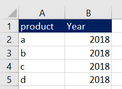
I have created a simple dummy variant of my dataset. Ofcourse the real dataset is much larger, but it is basically like this:
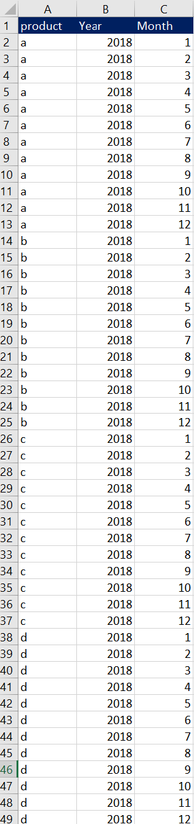
My desired result would be to automatically add 12 rows for each row, standing for the months. So my desired result looks like this:
Case somebody help me with the M language command that I would need to achieve this?
Solved! Go to Solution.
Hi @Anonymous
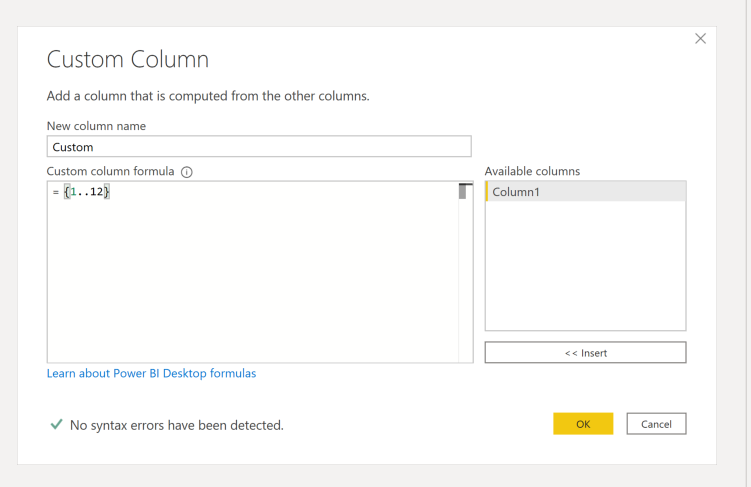
You can add a custom column with this syntax = { 1..12 } this will create a list that you will be able to expand into rows.
Hi @Anonymous
You can add a custom column with this syntax = { 1..12 } this will create a list that you will be able to expand into rows.
Thanks a lot, this was exactly what I needed!
Check out the May 2026 Power BI update to learn about new features.
Sign up to receive a private message when registration opens and key events begin.
If you have recently started exploring Fabric, we'd love to hear how it's going. Your feedback can help with product improvements.
| User | Count |
|---|---|
| 4 | |
| 3 | |
| 2 | |
| 2 | |
| 1 |