Get certified for free when you join Fabric Data Days 2026 and dive into Fabric, Power BI, SQL, AI, and other essential data skills.
Join nowData Days is here! Join us now for 60+ days of learning, challenges, and connection. Learn more
I have a relativally simple question, but I can't figure out how to solve it.
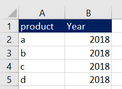
I have created a simple dummy variant of my dataset. Ofcourse the real dataset is much larger, but it is basically like this:
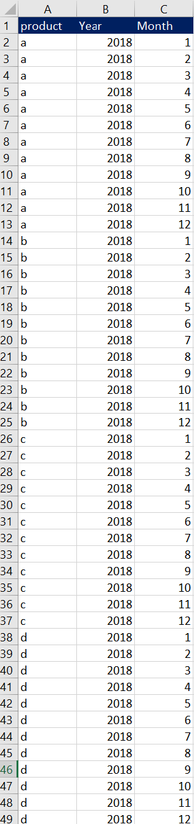
My desired result would be to automatically add 12 rows for each row, standing for the months. So my desired result looks like this:
Case somebody help me with the M language command that I would need to achieve this?
Solved! Go to Solution.
Hi @Anonymous
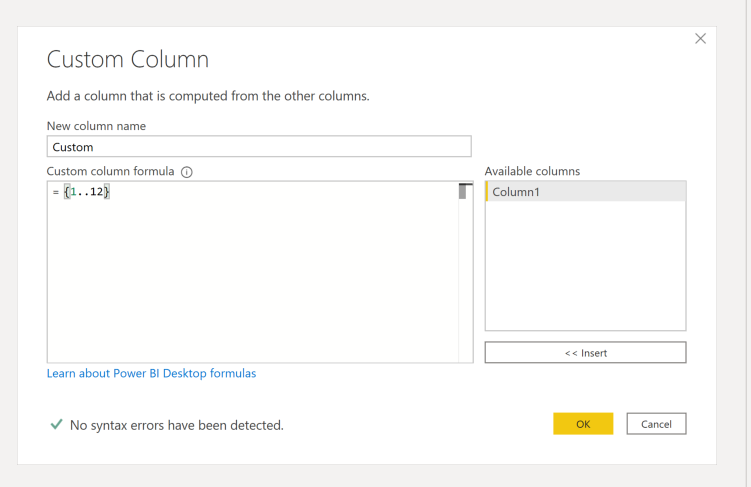
You can add a custom column with this syntax = { 1..12 } this will create a list that you will be able to expand into rows.
Hi @Anonymous
You can add a custom column with this syntax = { 1..12 } this will create a list that you will be able to expand into rows.
Thanks a lot, this was exactly what I needed!
Don't miss out on Data Days, June 15 through August 7. Learn Fabric, Power BI, SQL, AI and more.
Check out the May 2026 Power BI update to learn about new features.
| User | Count |
|---|---|
| 5 | |
| 4 | |
| 3 | |
| 2 | |
| 1 |
| User | Count |
|---|---|
| 11 | |
| 11 | |
| 5 | |
| 4 | |
| 3 |