cancel
Showing results for 
Search instead for 
Did you mean: 

Learn from the best! Meet the four finalists headed to the FINALS of the Power BI Dataviz World Championships! Register now

Reply
Anonymous
Not applicable

Adding rows based on Conditions

Hey guys,

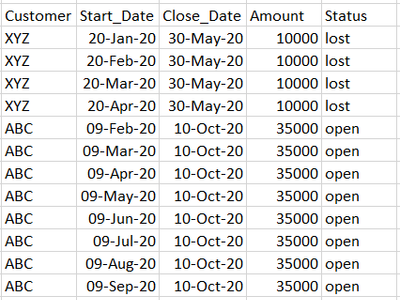
I have a sample data

lmadanmohan_0-1605090566265.png

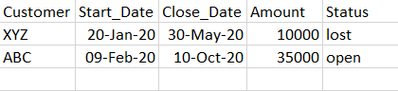
and I am trying to bring in additional rows for every month in between the start date and close date.

something like this:

lmadanmohan_0-1605095350599.png

Please help!!!

1 ACCEPTED SOLUTION
Jimmy801
Community Champion
Community Champion

Hello @Anonymous 


check out this approach. Uses Table.TransformRows to make duplicates of your rows, and apply then needed changes. Afterwards the data is transformed back from a list of records to a table.

let
    Source = Table.FromRows(Json.Document(Binary.Decompress(Binary.FromText("i45WclTSUTIy0DMw1DMyADKNgUxTCNPQAAiAdE5+cYlSrE60khOQY2CpZ2AEk9cDIoguU4jS/ILUPKXYWAA=", BinaryEncoding.Base64), Compression.Deflate)), let _t = ((type nullable text) meta [Serialized.Text = true]) in type table [Customer = _t, #"Start Date" = _t, #"Close date" = _t, Amount = _t, Status = _t]),
    #"Changed Type" = Table.TransformColumnTypes(Source,{{"Customer", type text}, {"Start Date", type date}, {"Close date", type date}, {"Amount", Int64.Type}, {"Status", type text}}, "de-DE"), 
    TransformRows= Table.TransformRows
    (
        #"Changed Type",
        (row)=> 
        let 
            HoOftenDuplicate =  Number.RoundDown(Duration.TotalDays(row[Close date]- row[Start Date])/30, 0),
            Duplicate = List.Transform(List.Numbers(0, HoOftenDuplicate), (translist)=> Record.TransformFields(row, {{"Start Date", each Date.AddMonths(_, translist)}}))
        in 
            Duplicate
    ),
    CreateFinalTable = Table.FromRecords(List.Combine(TransformRows))
in
    CreateFinalTable

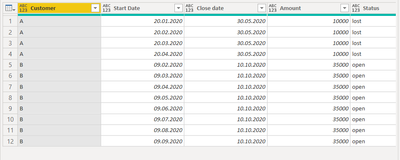
Jimmy801_0-1605098446540.png

Jimmy801_1-1605098462093.png

Copy paste this code to the advanced editor in a new blank query to see how the solution works.

If this post helps or solves your problem, please mark it as solution (to help other users find useful content and to acknowledge the work of users that helped you)
Kudoes are nice too

Have fun

Jimmy


View solution in original post

2 REPLIES 2
Jimmy801
Community Champion
Community Champion

Hello @Anonymous 


check out this approach. Uses Table.TransformRows to make duplicates of your rows, and apply then needed changes. Afterwards the data is transformed back from a list of records to a table.

let
    Source = Table.FromRows(Json.Document(Binary.Decompress(Binary.FromText("i45WclTSUTIy0DMw1DMyADKNgUxTCNPQAAiAdE5+cYlSrE60khOQY2CpZ2AEk9cDIoguU4jS/ILUPKXYWAA=", BinaryEncoding.Base64), Compression.Deflate)), let _t = ((type nullable text) meta [Serialized.Text = true]) in type table [Customer = _t, #"Start Date" = _t, #"Close date" = _t, Amount = _t, Status = _t]),
    #"Changed Type" = Table.TransformColumnTypes(Source,{{"Customer", type text}, {"Start Date", type date}, {"Close date", type date}, {"Amount", Int64.Type}, {"Status", type text}}, "de-DE"), 
    TransformRows= Table.TransformRows
    (
        #"Changed Type",
        (row)=> 
        let 
            HoOftenDuplicate =  Number.RoundDown(Duration.TotalDays(row[Close date]- row[Start Date])/30, 0),
            Duplicate = List.Transform(List.Numbers(0, HoOftenDuplicate), (translist)=> Record.TransformFields(row, {{"Start Date", each Date.AddMonths(_, translist)}}))
        in 
            Duplicate
    ),
    CreateFinalTable = Table.FromRecords(List.Combine(TransformRows))
in
    CreateFinalTable

Jimmy801_0-1605098446540.png

Jimmy801_1-1605098462093.png

Copy paste this code to the advanced editor in a new blank query to see how the solution works.

If this post helps or solves your problem, please mark it as solution (to help other users find useful content and to acknowledge the work of users that helped you)
Kudoes are nice too

Have fun

Jimmy


Anonymous
Not applicable

Thanks a lot. Thats of great help.

Helpful resources

Announcements
Power BI DataViz World Championships carousel

Power BI DataViz World Championships - June 2026

A new Power BI DataViz World Championship is coming this June! Don't miss out on submitting your entry.

Join our Fabric User Panel

Join our Fabric User Panel

Share feedback directly with Fabric product managers, participate in targeted research studies and influence the Fabric roadmap.

March Power BI Update Carousel

Power BI Community Update - March 2026

Check out the March 2026 Power BI update to learn about new features.