Don't miss your chance to take the Fabric Data Engineer (DP-600) exam for FREE! Find out how by watching the DP-600 session on-demand now through April 28th.
Learn moreJoin the FabCon + SQLCon recap series. Up next: Power BI, Real-Time Intelligence, IQ and AI, and Data Factory take center stage. All sessions are available on-demand after the live show. Register now
It's very easy to create a column index in Power Query or Power BI Desktop, but I'm not sure what advantages they confer.
When I used to work on large DB2 or Oracle systems, if searches were slow, asking a DBA to add an Index was the usual solution (quite how it all worked was of no concern to anyone but the DBAs)
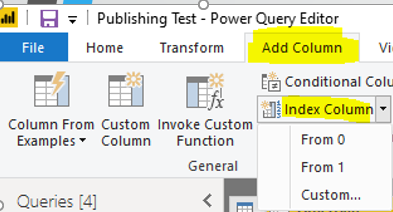
Now in Power BI I can create a column index easily,
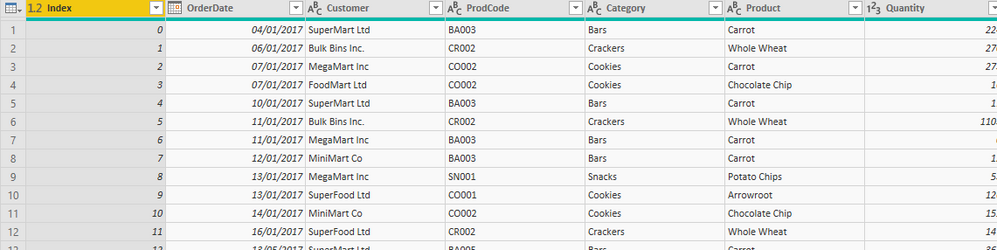
.... but all this gives me is a numbered index column for each row:
How does this improve performance? Am I missing something?
And why should anyone use a Custom Index, which just seems to complicate things?
Thanks for your help!
Solved! Go to Solution.
Hi @Anonymous
In Power BI, Index can't improve performace as index does in DB.
Index would be needed in many scenario, for example, numbering grouped data in Power Query.
To improve Performace, you could refer to the following article.
https://docs.microsoft.com/en-us/power-bi/power-bi-reports-performance
https://www.sqlbi.com/articles/introducing-the-power-bi-performance-analyzer/
Hi @Anonymous
In Power BI, Index can't improve performace as index does in DB.
Index would be needed in many scenario, for example, numbering grouped data in Power Query.
To improve Performace, you could refer to the following article.
https://docs.microsoft.com/en-us/power-bi/power-bi-reports-performance
https://www.sqlbi.com/articles/introducing-the-power-bi-performance-analyzer/
Check out the April 2026 Power BI update to learn about new features.
If you have recently started exploring Fabric, we'd love to hear how it's going. Your feedback can help with product improvements.
A new Power BI DataViz World Championship is coming this June! Don't miss out on submitting your entry.
| User | Count |
|---|---|
| 6 | |
| 5 | |
| 5 | |
| 5 | |
| 4 |