Get Fabric or SQL Certified for Free.
Get certified for free when you join Fabric Data Days 2026 and dive into Fabric, Power BI, SQL, AI, and other essential data skills.
Join now- Power BI forums
- Get Help with Power BI
- Desktop
- Service
- Report Server
- Power Query
- Mobile Apps
- Developer
- DAX Commands and Tips
- Custom Visuals Development Discussion
- Health and Life Sciences
- Power BI Spanish forums
- Translated Spanish Desktop
- Training and Consulting
- Instructor Led Training
- Dashboard in a Day for Women, by Women
- Galleries
- Data Stories Gallery
- Themes Gallery
- Contests Gallery
- QuickViz Gallery
- Quick Measures Gallery
- Visual Calculations Gallery
- Notebook Gallery
- Translytical Task Flow Gallery
- TMDL Gallery
- R Script Showcase
- Webinars and Video Gallery
- Ideas
- Custom Visuals Ideas (read-only)
- Issues
- Issues
- Events
- Upcoming Events
Try your skills in the Power BI Dataviz World Championship! Round one ends June 26. Join now
- Power BI forums
- Forums
- Get Help with Power BI
- Power Query
- Add timecolumn to another timecolumn
- Subscribe to RSS Feed
- Mark Topic as New
- Mark Topic as Read
- Float this Topic for Current User
- Bookmark
- Subscribe
- Printer Friendly Page


- Mark as New
- Bookmark
- Subscribe
- Mute
- Subscribe to RSS Feed
- Permalink
- Report Inappropriate Content
Add timecolumn to another timecolumn
I have a pbix file with 2 timecolumns coming from a CSV; 1 is a fixed value for the whole CSV (let's say 15:00:00) and the second column is chanching for every row (let's say; 00:00:01, 00:00:01, 00:00:01, 00:00:02, 00:00:02, 00:00:03, 00:00:03, 00:00:03, 00:00:03, 00:00:03......). Now I want to create a combined column which gives these output: 15:00:01, 15:00:01, 15:00:01, 15:00:02, 15:00:02, 15:00:03, 15:00:03, 15:00:03, 15:00:03, 15:00:03.
Can somebody give me a hint about what to do?
I've been trying so many things:
- using duration function (but couldn't get it done with a variable amount of seconds
- converting time to number
- converting time to text/string and stripping it and calculating the amount of hours, minutes and seconds
- adding a date to the first time to make it possible to use and so on
Everything is hard or gives problems. But I'm pretty sure it must be possible and not really hard. Somebody has a tip for me?
Solved! Go to Solution.


- Mark as New
- Bookmark
- Subscribe
- Mute
- Subscribe to RSS Feed
- Permalink
- Report Inappropriate Content
time is basically a fraction between 0 and 1 (24h)
try changing the type while adding a new step:
1) first from time to decimal
2) from decimal to duration
similar to this
let
    Source = Table.FromRows(Json.Document(Binary.Decompress(Binary.FromText("i45WMjS1MjAAIiUdJTANYsbqYBM3xCFuRKK4qVJsLAA=", BinaryEncoding.Base64), Compression.Deflate)), let _t = ((type text) meta [Serialized.Text = true]) in type table [Column1 = _t, Column2 = _t]),
    #"Changed Type" = Table.TransformColumnTypes(Source,{{"Column1", type time}, {"Column2", type time}}),
    #"Changed Type to decimal" = Table.TransformColumnTypes(#"Changed Type",{{"Column2", type number}}),
    #"Changed Type to duration" = Table.TransformColumnTypes(#"Changed Type to decimal",{{"Column2", type duration}})
in
    #"Changed Type to duration"
Proud to be a Datanaut!
Thank you for the kudos 🙂
- Mark as New
- Bookmark
- Subscribe
- Mute
- Subscribe to RSS Feed
- Permalink
- Report Inappropriate Content
Hi @v-frfei-msft and @Stachu ,
That doesn't work. It gives this error:
DataFormat.Error: Can't convert to duration.
Details:
00:00:00
So the problem is (I think) that you have a different format. I do have 00:00:00 and you do have 0.00:00:00... But I can't change it right now I guess?
- Mark as New
- Bookmark
- Subscribe
- Mute
- Subscribe to RSS Feed
- Permalink
- Report Inappropriate Content
time is basically a fraction between 0 and 1 (24h)
try changing the type while adding a new step:
1) first from time to decimal
2) from decimal to duration
similar to this
let
    Source = Table.FromRows(Json.Document(Binary.Decompress(Binary.FromText("i45WMjS1MjAAIiUdJTANYsbqYBM3xCFuRKK4qVJsLAA=", BinaryEncoding.Base64), Compression.Deflate)), let _t = ((type text) meta [Serialized.Text = true]) in type table [Column1 = _t, Column2 = _t]),
    #"Changed Type" = Table.TransformColumnTypes(Source,{{"Column1", type time}, {"Column2", type time}}),
    #"Changed Type to decimal" = Table.TransformColumnTypes(#"Changed Type",{{"Column2", type number}}),
    #"Changed Type to duration" = Table.TransformColumnTypes(#"Changed Type to decimal",{{"Column2", type duration}})
in
    #"Changed Type to duration"
Proud to be a Datanaut!
Thank you for the kudos 🙂
- Mark as New
- Bookmark
- Subscribe
- Mute
- Subscribe to RSS Feed
- Permalink
- Report Inappropriate Content
Yes, that's the trick. Great!


- Mark as New
- Bookmark
- Subscribe
- Mute
- Subscribe to RSS Feed
- Permalink
- Report Inappropriate Content
Hi @MiKeZZa ,
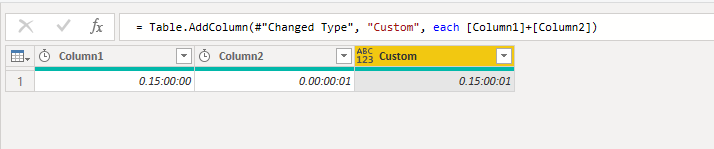
As @Stachu said, you should change the data type to durition. Here I made a sample for your reference, please check the M code as below.
let
    Source = Table.FromRows(Json.Document(Binary.Decompress(Binary.FromText("i45WMjS1MjAAIiUdJTBtZWCoFBsLAA==", BinaryEncoding.Base64), Compression.Deflate)), let _t = ((type text) meta [Serialized.Text = true]) in type table [Column1 = _t, Column2 = _t]),
    #"Changed Type" = Table.TransformColumnTypes(Source,{{"Column2", type duration}, {"Column1", type duration}}),
    #"Added Custom" = Table.AddColumn(#"Changed Type", "Custom", each [Column1]+[Column2])
in
    #"Added Custom"
If this post helps, then please consider Accept it as the solution to help the others find it more quickly.
- Mark as New
- Bookmark
- Subscribe
- Mute
- Subscribe to RSS Feed
- Permalink
- Report Inappropriate Content
can you change the second column to data type Duration and then add the 2 columns?
Thank you for the kudos 🙂

Helpful resources

Data Days 2026
Don't miss out on Data Days, June 15 through August 7. Learn Fabric, Power BI, SQL, AI and more.

Power BI DataViz World Championships - June 2026
A new Power BI DataViz World Championship is coming this June! Don't miss out on submitting your entry.


| User | Count |
|---|---|
| 12 | |
| 6 | |
| 6 | |
| 5 | |
| 5 |


