Don't miss your chance to take the Fabric Data Engineer (DP-600) exam for FREE! Find out how by watching the DP-600 session on-demand now through April 28th.
Learn moreJoin the FabCon + SQLCon recap series. Up next: Power BI, Real-Time Intelligence, IQ and AI, and Data Factory take center stage. All sessions are available on-demand after the live show. Register now
Hi,
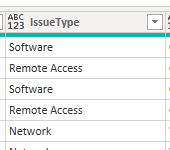
I am fairly new to power query and I am having an issue with a sort of if function, in which i need a new column to return a date/time plus a few days/hours based of a condition in another column. Im not really sure how to set up the syntax and the column?
Solved! Go to Solution.
Yup, no problem.
Create a new custom column in Power Query with this structure:
if [Issue Type] = "Hardware" then [Created] + #duration(0, 4, 0, 0) //four hours
else if [Issue Type] = "Software" then [Created] + #duration(4, 0, 0, 0) //four days
else if [Issue Type] = "Remote Access" then [Created] + #duration(0, 0, 4, 0) //four minutes
... etc.
else // your escape value e.g. null, [Created]
Pete
Proud to be a Datanaut!
Hi @Jon8930 ,
If you can provide a simple example of what your source data looks like and what your expected output looks like for each variable then this shouldn't be too difficult to sort for you.
Pete
Proud to be a Datanaut!
For example,
I would like a new column called SLA, to do the following:
(I am aware this an excel formula buts the best way can explain it)
each if [Issue Type] = "Hardware" then [CreatedDate] + I want it to add either a few hours or a few days.
The new columm i want to return the modified date/time dependant on the condition.
So if hardare add four hours etc.
Hope this makes sense.
Yup, no problem.
Create a new custom column in Power Query with this structure:
if [Issue Type] = "Hardware" then [Created] + #duration(0, 4, 0, 0) //four hours
else if [Issue Type] = "Software" then [Created] + #duration(4, 0, 0, 0) //four days
else if [Issue Type] = "Remote Access" then [Created] + #duration(0, 0, 4, 0) //four minutes
... etc.
else // your escape value e.g. null, [Created]
Pete
Proud to be a Datanaut!
Check out the April 2026 Power BI update to learn about new features.
If you have recently started exploring Fabric, we'd love to hear how it's going. Your feedback can help with product improvements.
A new Power BI DataViz World Championship is coming this June! Don't miss out on submitting your entry.
| User | Count |
|---|---|
| 3 | |
| 2 | |
| 2 | |
| 2 | |
| 2 |
| User | Count |
|---|---|
| 5 | |
| 5 | |
| 4 | |
| 4 | |
| 4 |