Get certified for free when you join Fabric Data Days 2026 and dive into Fabric, Power BI, SQL, AI, and other essential data skills.
Join nowJuly 7 - July 17 | Round 2 of the Power BI Dataviz World Championships. Don't miss your chance! Learn more
Hi All,
There is a open source web site https://discover.data.vic.gov.au/dataset/victorian-coronavirus-data/resource/bc71e010-253a-482a-bdbc... that I need PBI to connect to and download the data. It has a embedded data table.
I can't use the google docs option so I have tried using get data Website, ODATA and the API option and I have been unable to get the data, PBI says the URL invalid.
So I am hoping someone who is good with HTML or API can assist me.
Thanks
Solved! Go to Solution.
Hi @ringovski ,
Please refer to:
let
Source = Json.Document(Web.Contents("https://discover.data.vic.gov.au/api/3/action/datastore_search?resource_id=bc71e010-253a-482a-bdbc-d65d1befe526")),
#"Converted to Table" = Table.FromRecords({Source}),
#"Expanded result" = Table.ExpandRecordColumn(#"Converted to Table", "result", {"include_total", "limit", "records_format", "resource_id", "total_estimation_threshold", "records", "fields", "_links", "total", "total_was_estimated"}, {"result.include_total", "result.limit", "result.records_format", "result.resource_id", "result.total_estimation_threshold", "result.records", "result.fields", "result._links", "result.total", "result.total_was_estimated"}),
#"Expanded result._links" = Table.ExpandRecordColumn(#"Expanded result", "result._links", {"start", "next"}, {"result._links.start", "result._links.next"}),
#"Expanded result.records" = Table.ExpandListColumn(#"Expanded result._links", "result.records"),
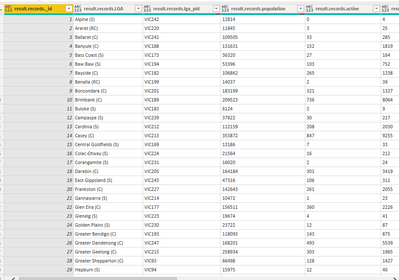
#"Expanded result.records1" = Table.ExpandRecordColumn(#"Expanded result.records", "result.records", {"_id", "LGA", "lga_pid", "population", "active", "cases", "rate", "new", "band", "LGADisplay", "data_date", "file_processed_date"}, {"result.records._id", "result.records.LGA", "result.records.lga_pid", "result.records.population", "result.records.active", "result.records.cases", "result.records.rate", "result.records.new", "result.records.band", "result.records.LGADisplay", "result.records.data_date", "result.records.file_processed_date"}),
#"Removed Columns" = Table.RemoveColumns(#"Expanded result.records1",{"help", "success", "result.include_total", "result.limit", "result.records_format", "result.resource_id", "result.total_estimation_threshold", "result.fields", "result._links.start", "result._links.next", "result.total", "result.total_was_estimated"})
in
#"Removed Columns"
Best Regards,
Liang
If this post helps, then please consider Accept it as the solution to help the other members find it more quickly.
Hi @ringovski ,
Please refer to:
let
Source = Json.Document(Web.Contents("https://discover.data.vic.gov.au/api/3/action/datastore_search?resource_id=bc71e010-253a-482a-bdbc-d65d1befe526")),
#"Converted to Table" = Table.FromRecords({Source}),
#"Expanded result" = Table.ExpandRecordColumn(#"Converted to Table", "result", {"include_total", "limit", "records_format", "resource_id", "total_estimation_threshold", "records", "fields", "_links", "total", "total_was_estimated"}, {"result.include_total", "result.limit", "result.records_format", "result.resource_id", "result.total_estimation_threshold", "result.records", "result.fields", "result._links", "result.total", "result.total_was_estimated"}),
#"Expanded result._links" = Table.ExpandRecordColumn(#"Expanded result", "result._links", {"start", "next"}, {"result._links.start", "result._links.next"}),
#"Expanded result.records" = Table.ExpandListColumn(#"Expanded result._links", "result.records"),
#"Expanded result.records1" = Table.ExpandRecordColumn(#"Expanded result.records", "result.records", {"_id", "LGA", "lga_pid", "population", "active", "cases", "rate", "new", "band", "LGADisplay", "data_date", "file_processed_date"}, {"result.records._id", "result.records.LGA", "result.records.lga_pid", "result.records.population", "result.records.active", "result.records.cases", "result.records.rate", "result.records.new", "result.records.band", "result.records.LGADisplay", "result.records.data_date", "result.records.file_processed_date"}),
#"Removed Columns" = Table.RemoveColumns(#"Expanded result.records1",{"help", "success", "result.include_total", "result.limit", "result.records_format", "result.resource_id", "result.total_estimation_threshold", "result.fields", "result._links.start", "result._links.next", "result.total", "result.total_was_estimated"})
in
#"Removed Columns"
Best Regards,
Liang
If this post helps, then please consider Accept it as the solution to help the other members find it more quickly.
Join us in Barcelona for FabCon and SQLCon, the Fabric, Power BI, SQL, and AI community event. Save €200 with code FABCMTY200.
Check out the July 2026 Power BI update to learn about new features.
Join Data Days 2026: 60 days of free live/on-demand sessions, challenges, study groups, and certification opportunities.
| User | Count |
|---|---|
| 2 | |
| 2 | |
| 1 | |
| 1 | |
| 1 |