cancel
Showing results for 
Search instead for 
Did you mean: 

The Power BI Data Visualization World Championships is back! It's time to submit your entry. Live now!

Reply
wadezone
Frequent Visitor

Using Node.js (Playwright) how to utilize columnHeader; rowHeader instead of nth-child

Trying to use playwright to automate testing Power BI reports like the user would click. I am trying to "get" a value from a visual. I have it working using the nth-child(#) or nth-of-type(#). 


Example.

These work to click or "get" the value:

awaitpage.click('.bodyCells > :nth-child(1) > :nth-child(1) > :nth-child(4) > div:nth-of-type(1)'); 


consttest4 = awaitpage.textContent('.bodyCells > :nth-child(1) > :nth-child(1) > :nth-child(4) > div:nth-of-type(1)'); 

console.log(test4); 


consttest5 = awaitpage.textContent('.bodyCells > :nth-child(1) > :nth-child(1) > :nth-child(4) > :nth-child(1)'); 

console.log(test5);


constelementByClass = awaitpage.$('.bodyCells > :nth-child(1) > :nth-child(1) > :nth-child(4) > div:nth-of-type(1)') 

constinnerText = awaitelementByClass.innerText() 

console.log(innerText) 


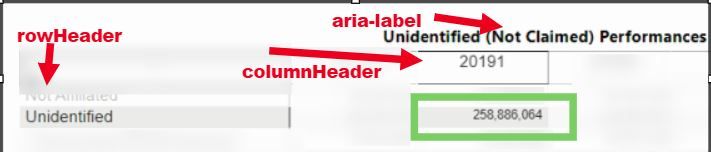
Is there a way to not use the "nth-child" and actually reference the "div title=rowHeader name" and the "div title = columnHeader name" to "get" the value in that cell of this visual. example below get 258,886.064 


cell.JPG

0 REPLIES 0

Helpful resources

Announcements
FabCon Atlanta 2026 carousel

FabCon Atlanta 2026

Join us at FabCon Atlanta, March 16-20, for the ultimate Fabric, Power BI, AI and SQL community-led event. Save $200 with code FABCOMM.