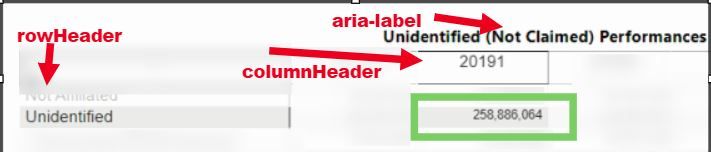
Trying to use playwright to automate testing Power BI reports like the user would click. I am trying to "get" a value from a visual. I have it working using the nth-child(#) or nth-of-type(#).
Example.
These work to click or "get" the value:
await page.click('.bodyCells > :nth-child(1) > :nth-child(1) > :nth-child(4) > div:nth-of-type(1)');
const test4 = await page.textContent('.bodyCells > :nth-child(1) > :nth-child(1) > :nth-child(4) > div:nth-of-type(1)');
console.log(test4);
const test5 = await page.textContent('.bodyCells > :nth-child(1) > :nth-child(1) > :nth-child(4) > :nth-child(1)');
console.log(test5);
const elementByClass = await page.$('.bodyCells > :nth-child(1) > :nth-child(1) > :nth-child(4) > div:nth-of-type(1)')
const innerText = await elementByClass.innerText()
console.log(innerText)
Is there a way to not use the "nth-child" and actually reference the "div title=rowHeader name" and the "div title = columnHeader name" to "get" the value in that cell of this visual. example below get 258,886.064