This is best Fabric, Power BI, SQL and AI community event. How do we know? The last event sold out! Save €200 with code FABCMTY200.
Register nowA new Data Days event is coming soon! This time we’re going bigger than ever. Fabric, Power BI, SQL, AI and more. Don't miss out.
I have a PowerBI report, and I want to update Accountname and accountkey using Rest API. I found a way to use parameter as an account name, but didn't find anything on AccountKey.
Any help regarding this? Is it possible to update it using this-
https://docs.microsoft.com/en-us/rest/api/power-bi/datasets/updatedatasources
OR-
https://docs.microsoft.com/en-us/rest/api/power-bi/datasets/updateparameters
In Any way?
Hi,
I hope you can help me!
How can i update my azure blob credentials in powerbi with SA access api (rest api)
I keep getting a bad request.
Hi @sipati ,
Currently you couldn't able to use either parameters/ update datasource api to dynamically change the account key from the azure blob.
The only workaround for this, you have to use a gateway.
Hello @Jayendran ,
Any reason why it is not possible to update the Credentials for the Blob storage?
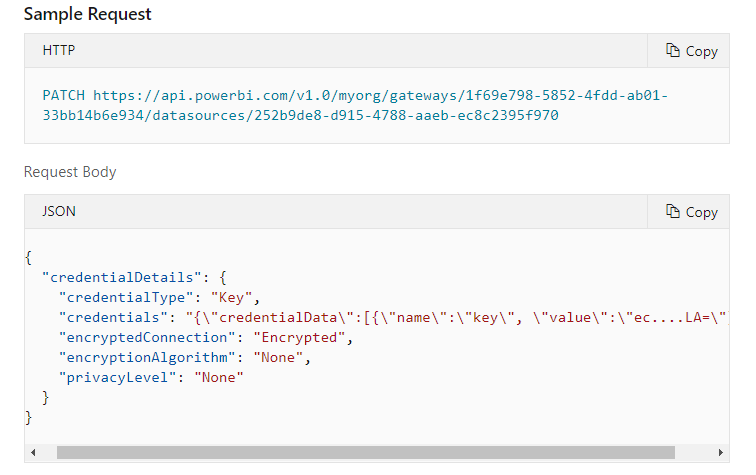
Becaue based on the MSFT documentation link :
we can patch the Cred with Key type :
So cant we use this powershell to update the cred:
Invoke-PowerBIRestMethod -Url "gateways/$($BounGateway.value.gatewayId)/datasources/$($BounGateway.value.id)" -Method PATCH -Body $Body | ConvertFrom-Json
where the body is the above JSON format .
Thanks
Good Morning... I can update the credential, but the records are not updating Did you succeed with this feature?
Hi @NandanHegde ,
Thanks for correcting me . I can confirm using update datasource you can update the keys.
Good catch ! Sorry for the wrong information
Check out the May 2026 Power BI update to learn about new features.
Sign up to receive a private message when registration opens and key events begin.
If you have recently started exploring Fabric, we'd love to hear how it's going. Your feedback can help with product improvements.
| User | Count |
|---|---|
| 2 | |
| 1 | |
| 1 | |
| 1 | |
| 1 |