Don't miss your chance to take exam DP-600 or DP-700 on us!
Request nowLearn from the best! Meet the four finalists headed to the FINALS of the Power BI Dataviz World Championships! Register now
HI All,
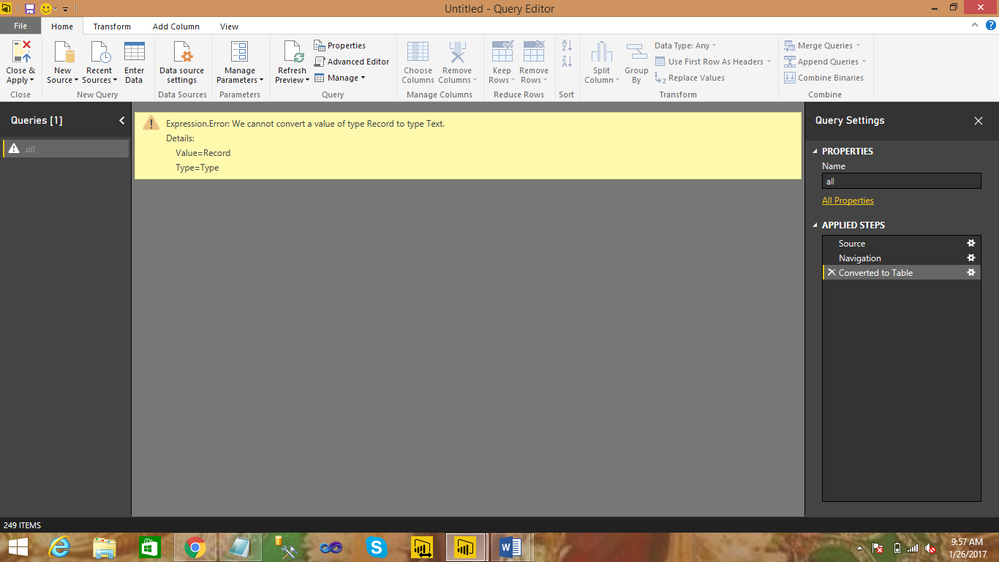
When selecting source as rest api data,i get response able to see the output,but converting into a table getting the
following error .could please help any one how do you resolve the following error.
PUBLIC API LINK:http://services.groupkt.com/country/get/all
ErrorName:
Regards,
J Pavan
8801262055
Solved! Go to Solution.
Hi @pavan1,
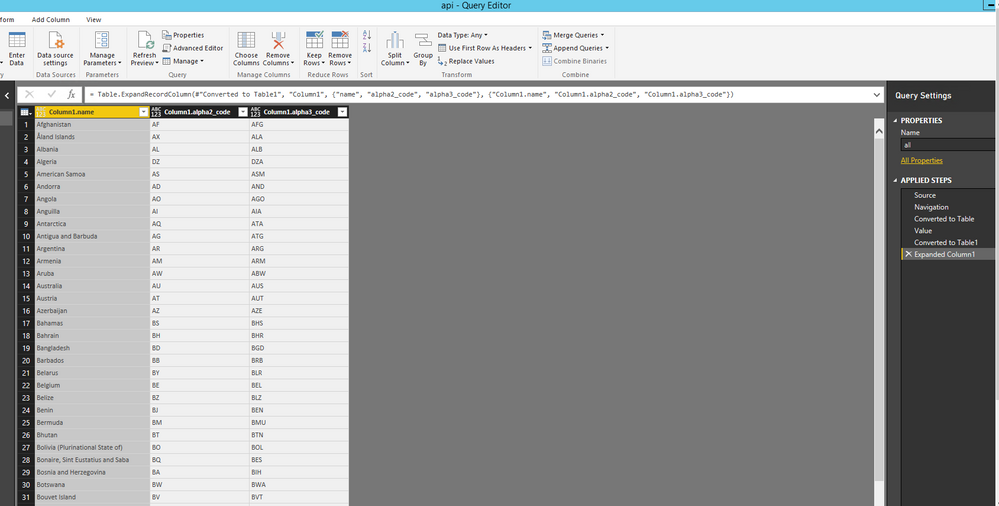
Do you want to get the following query in Power BI Desktop? If so, please check the attached PBIX file to get more details about how to extract data from your data source.
Thanks,
Lydia Zhang
Hi @pavan1,
Do you want to get the following query in Power BI Desktop? If so, please check the attached PBIX file to get more details about how to extract data from your data source.
Thanks,
Lydia Zhang
Lydia, this is neat, but how did you create this PBIX file? I see that the Data Source settings contain a JSON object, but in my PBIX files they all use SQL tables. Can you post the steps for how to source a JSON query in Power BI?
Share feedback directly with Fabric product managers, participate in targeted research studies and influence the Fabric roadmap.
Check out the February 2026 Power BI update to learn about new features.
| User | Count |
|---|---|
| 3 | |
| 3 | |
| 2 | |
| 1 | |
| 1 |
| User | Count |
|---|---|
| 3 | |
| 2 | |
| 2 | |
| 2 | |
| 2 |