Don't miss your chance to take the Fabric Data Engineer (DP-600) exam for FREE! Find out how by watching the DP-600 session on-demand now through April 28th.
Learn moreJoin the FabCon + SQLCon recap series. Up next: Power BI, Real-Time Intelligence, IQ and AI, and Data Factory take center stage. All sessions are available on-demand after the live show. Register now
Hi
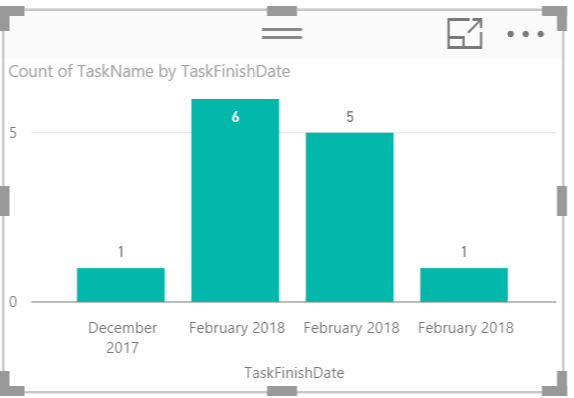
Im trying to create a column chart which displays the number of tasks per month that have a shipping date relevant to that month.
I have 1 table called tasks. In tasks i have task name and task finish date. I cant get it to sum the values, in pic u can see it puts the months next to each other Also i have specific dates for each finish date, so i have in power bi changed these values to be a month field.. i dont need cumulative i just need to show how many projects have finish dates in that month for specific tasks.
thanks in advance 🙂
N
Solved! Go to Solution.
Have you tried to create a calculated column based on the specific date and create a column chart based on the shipping month.
shipping month = DATE(YEAR(Task[ShippingDate]),MONTH(Task[ShippingDate]),1)
Have you tried to create a calculated column based on the specific date and create a column chart based on the shipping month.
shipping month = DATE(YEAR(Task[ShippingDate]),MONTH(Task[ShippingDate]),1)
thankyou - i was able to add a grouping to the date on x axis- which allowed me to create a bin which i selected per month (voila!!)
So isn't adding a grouping work for you now? If not, could you be more specific? I don't get too much idea from the original post.
Check out the April 2026 Power BI update to learn about new features.
If you have recently started exploring Fabric, we'd love to hear how it's going. Your feedback can help with product improvements.
A new Power BI DataViz World Championship is coming this June! Don't miss out on submitting your entry.
| User | Count |
|---|---|
| 2 | |
| 1 | |
| 1 | |
| 1 | |
| 1 |