Get certified for free when you join Fabric Data Days 2026 and dive into Fabric, Power BI, SQL, AI, and other essential data skills.
Join nowData Days is here! Join us now for 60+ days of learning, challenges, and connection. Learn more
Hi
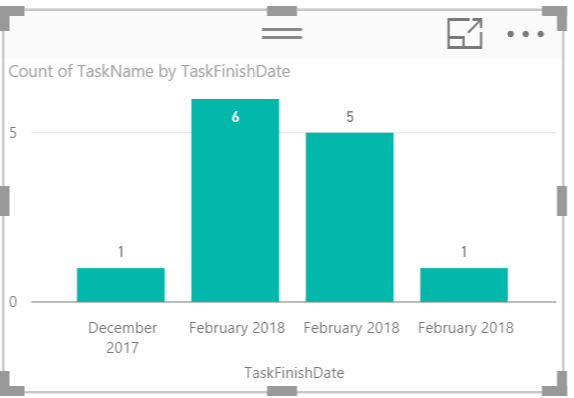
Im trying to create a column chart which displays the number of tasks per month that have a shipping date relevant to that month.
I have 1 table called tasks. In tasks i have task name and task finish date. I cant get it to sum the values, in pic u can see it puts the months next to each other Also i have specific dates for each finish date, so i have in power bi changed these values to be a month field.. i dont need cumulative i just need to show how many projects have finish dates in that month for specific tasks.
thanks in advance 🙂
N
Solved! Go to Solution.
Have you tried to create a calculated column based on the specific date and create a column chart based on the shipping month.
shipping month = DATE(YEAR(Task[ShippingDate]),MONTH(Task[ShippingDate]),1)
Have you tried to create a calculated column based on the specific date and create a column chart based on the shipping month.
shipping month = DATE(YEAR(Task[ShippingDate]),MONTH(Task[ShippingDate]),1)
thankyou - i was able to add a grouping to the date on x axis- which allowed me to create a bin which i selected per month (voila!!)
So isn't adding a grouping work for you now? If not, could you be more specific? I don't get too much idea from the original post.
Don't miss out on Data Days, June 15 through August 7. Learn Fabric, Power BI, SQL, AI and more.
Check out the May 2026 Power BI update to learn about new features.
| User | Count |
|---|---|
| 2 | |
| 2 | |
| 1 | |
| 1 | |
| 1 |