We've captured the moments from FabCon & SQLCon that everyone is talking about, and we are bringing them to the community, live and on-demand. Starts on April 14th. Register now
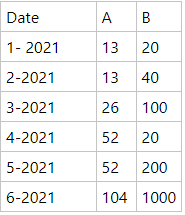
I've been trying to add automatic column with py script, but without a success. So the idea is to lets say i have a table like below:
Default Table
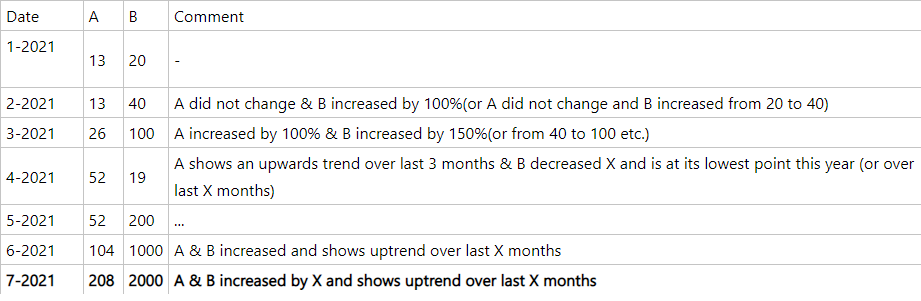
And the idea is to create a additional column which tells us a current situation of A or B value over time, so basically something like this: ( let's say that 7-th month data is updated)
Table with new column
Did anyone took similar approach to something like above? Looking for a suggestions & approach ideas or some solutions to problem above. A & B columns could also be like A (as value) and B as value category.
Thanks in advance!!
See if dynamic commentary in Power BI can meet your needs:
https://zebrabi.com/dynamic-commentary-power-bi/
https://blog.enterprisedna.co/adding-commentary-to-your-reports-in-a-dynamic-way/
You could do something like this with a measure incorporating a bunch of if/then logic specifying what you want to say in any conceivable situation but that seems pretty painful to write and not nearly as useful as showing a visual instead.
Obviously, but in my case there is a need to have tooltip/comments in addition to graph. My idea was to loop through dates and output value progression over time but as mentioned above - ended up without success.
Nested ifs are painful - i agree, but i consider it as last resort.
Thanks for your reply!
If you have recently started exploring Fabric, we'd love to hear how it's going. Your feedback can help with product improvements.
A new Power BI DataViz World Championship is coming this June! Don't miss out on submitting your entry.
Share feedback directly with Fabric product managers, participate in targeted research studies and influence the Fabric roadmap.
| User | Count |
|---|---|
| 1 | |
| 1 | |
| 1 | |
| 1 | |
| 1 |
| User | Count |
|---|---|
| 4 | |
| 2 | |
| 2 | |
| 2 | |
| 2 |