Don't miss your chance to take the Fabric Data Engineer (DP-600) exam for FREE! Find out how by attending the DP-600 session on April 23rd (pacific time), live or on-demand.
Learn moreNext up in the FabCon + SQLCon recap series: The roadmap for Microsoft SQL and Maximizing Developer experiences in Fabric. All sessions are available on-demand after the live show. Register now
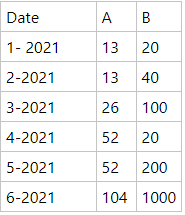
I've been trying to add automatic column with py script, but without a success. So the idea is to lets say i have a table like below:
Default Table
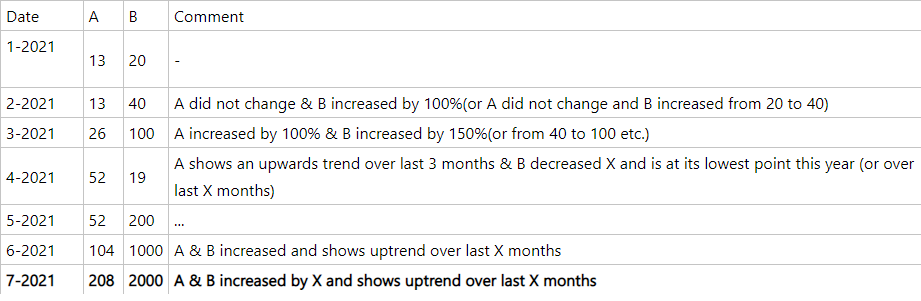
And the idea is to create a additional column which tells us a current situation of A or B value over time, so basically something like this: ( let's say that 7-th month data is updated)
Table with new column
Did anyone took similar approach to something like above? Looking for a suggestions & approach ideas or some solutions to problem above. A & B columns could also be like A (as value) and B as value category.
Thanks in advance!!
See if dynamic commentary in Power BI can meet your needs:
https://zebrabi.com/dynamic-commentary-power-bi/
https://blog.enterprisedna.co/adding-commentary-to-your-reports-in-a-dynamic-way/
You could do something like this with a measure incorporating a bunch of if/then logic specifying what you want to say in any conceivable situation but that seems pretty painful to write and not nearly as useful as showing a visual instead.
Obviously, but in my case there is a need to have tooltip/comments in addition to graph. My idea was to loop through dates and output value progression over time but as mentioned above - ended up without success.
Nested ifs are painful - i agree, but i consider it as last resort.
Thanks for your reply!
If you have recently started exploring Fabric, we'd love to hear how it's going. Your feedback can help with product improvements.
A new Power BI DataViz World Championship is coming this June! Don't miss out on submitting your entry.
Experience the highlights from FabCon & SQLCon, available live and on-demand starting April 14th.
| User | Count |
|---|---|
| 1 | |
| 1 | |
| 1 | |
| 1 | |
| 1 |
| User | Count |
|---|---|
| 8 | |
| 8 | |
| 4 | |
| 3 | |
| 2 |